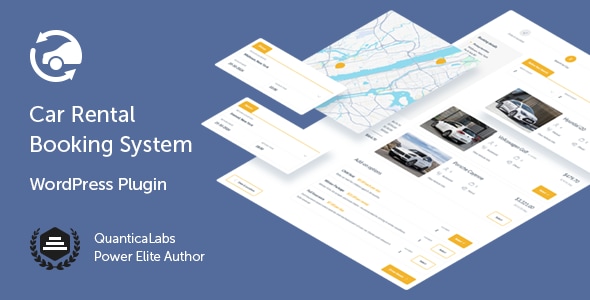
Car Rental Booking System for WordPress is a commercial plugin from QuanticaLabs that turns a WordPress site into a vehicle reservation platform, with a step-by-step booking form, a live availability calendar, multi-location fleet management and several payment routes. It is aimed at hire agencies, independent fleet owners and agencies building rental sites who want a self-hosted booking engine instead of paying commission to an aggregator. The plugin sells on CodeCanyon for $79 and has drawn 1,997 sales and a 4.58 out of 5 rating across 102 reviews.
The product sits in the Calendars category of the marketplace, but it is better understood as a full reservation system: the calendar is the visible surface of a deeper layer of pricing rules, vehicle records and location settings. That distinction matters when judging whether it fits a given project.
What the plugin actually handles
The core of the product is a guided booking flow. Customers move through defined steps, and a completed step can be reopened without wiping what was already entered. That last detail sounds minor but is a common failure point in cheaper booking scripts, where going back a screen resets the form. The vendor does not state how many steps the default flow uses or whether the order can be rearranged, so that is worth checking on the live demo before purchase.
Locations, maps and scheduling rules
Rental locations are first-class objects rather than a single global setting. Each one carries its own address, contact details and assigned vehicles, and appears on a map inside the booking form so the customer picks pickup and return points visually. More importantly, each location can hold its own booking window, minimum and maximum rental length, date- or location-based rules, business hours with break periods, after-hours pickup options and even its own payment methods and deposit settings. For a business with branches that keep different opening hours or seasonal terms, this is the feature that decides whether the plugin is usable at all.
When customers are allowed to type their own address, two supporting tools come into play. Google Autocomplete suggests addresses as they type, and geofence zones — polygons drawn on a map — can be used as conditions in pricing and availability rules. Custom location zones can also be restricted to selected countries or to a radius around a fixed address. In practice this lets an operator charge a different rate for an airport drop-off than for a city-centre pickup without building separate forms.
Fleet records and grouped vehicles
Vehicles are configurable in unusual depth: make and model, seating and luggage capacity, gearbox, engine type, daily mileage cap, minimum and maximum driver age, default pickup and return times, photo gallery, attributes and per-vehicle tax rates. A Group Code lets several identical cars appear as one bookable option in the form, which is how most rental sites actually present a fleet category rather than individual registration plates. Individual vehicles can also be blocked for specific dates and synced to a Google Calendar.
Pricing, extras and payment routes
The pricing model is built from combinable components: an initial fee, a per-day rate, a per-hour rate, a security deposit, and three separate delivery charges (per kilometre each way, or a flat fee). Add-ons such as child seats or additional drivers can be priced per rental period or per day, capped at a maximum quantity and given their own tax rate. Payment can be taken by cash, Stripe, PayPal, wire transfer or card on pickup, and if WooCommerce is active the site inherits whatever gateways WooCommerce supports. A built-in form builder handles agreements and consent fields, which is where GDPR compliance is usually addressed.
Where it fits, and where it does not
This is a sensible choice for a single-business rental site: an agency with two to ten branches, a camper or classic car hire operation, an airport transfer firm with a small fleet, or a rental company that wants bookings on its own domain with its own branding. It also suits freelancers and small agencies building such sites for clients, because the source files include PHP, JavaScript, HTML and CSS, and the plugin declares compatibility with Elementor, WPBakery, Visual Composer and WPML — the last being relevant for multilingual sites.
It is the wrong choice for a marketplace. Nothing in the supplied specification describes multiple independent vendors listing their own vehicles, splitting payouts or managing their own calendars. A business that wants to aggregate third-party fleets needs a multi-vendor rental platform, not this. It is also a poor fit for anyone who wants a booking system they can run without touching WordPress at all, since installation, updates and hosting all sit on the site owner.
Strengths and limitations
Strengths
- Per-location configuration covers booking windows, duration limits, business hours, deposits and payment methods — the detail level most rental operations actually need.
- Geofencing tied to pricing rules gives a way to price by service area without duplicating forms or vehicles.
- Group Codes solve the common problem of showing ten identical cars as one bookable category.
- Pricing components are granular, including separate delivery-out and delivery-return kilometre charges.
- WooCommerce integration means existing payment gateways and checkout infrastructure can be reused.
- An established track record: roughly 2,000 sales and a rating above 4.5, with the vendor shipping updates as recently as October 2026.
Limitations
- The feature set is deep enough that setup is a real project. Locations, geofences, pricing rules and vehicle attributes all interact, and the vendor’s documentation depth is not stated in the listing.
- Google services — maps, Autocomplete and Calendar sync — create a dependency on API keys and Google’s billing terms. Sites that block Google scripts or operate in regions with unreliable access will lose address lookup and map selection.
- No multi-vendor capability is described, which rules out marketplace use.
- Compatibility is declared up to WordPress 7.0.x and WooCommerce 10.x.x, but browser support still lists IE10 and IE11 — a sign that some legacy code paths remain, and worth noting for teams with strict front-end standards.
- At $79 for a single licence, the cost is modest, but ongoing updates depend on the vendor’s CodeCanyon support policy rather than a self-managed subscription.
How it compares with the wider category
Rental booking tools generally fall into three groups: hosted SaaS platforms, generic WordPress appointment plugins, and dedicated rental scripts like this one. Hosted platforms remove maintenance and often include their own payment processing, but they charge per booking or per month and keep the customer relationship on their infrastructure. Generic appointment plugins are cheaper and simpler, yet they model time slots rather than vehicles, so per-day rates, deposits, mileage limits and delivery fees have to be faked with custom fields.
This plugin competes on model fidelity: it understands that a rental has a pickup location, a return location, a duration in days or hours, a deposit and optional extras. The trade-off is that it assumes the buyer is comfortable administering WordPress — installing, configuring, backing up and keeping plugins current. Compared with a bespoke build, it is far cheaper and faster; compared with SaaS, it offers ownership and no per-booking fee but shifts operational responsibility to the site owner. Buyers who mainly need a simple availability calendar with a contact form will find it heavier than necessary.
Frequently Asked Questions
Does Car Rental Booking System work with WooCommerce?
Yes. The plugin declares compatibility with WooCommerce versions 5 through 10, and when WooCommerce is installed the booking can use any payment gateway that WooCommerce supports. Without it, payments run through the plugin’s own options: cash, Stripe, PayPal, wire transfer or card on pickup. The vendor does not state whether WooCommerce is required or optional at install time.
Can it manage more than one rental location?
Yes, the plugin supports unlimited rental locations. Each location has its own address, contact details, assigned vehicles, booking window, minimum and maximum rental duration, business hours, deposit settings and payment methods. Locations also appear on a map inside the booking form so customers can choose pickup and return points, and location-based rules can feed into pricing.
Is it suitable for a multi-vendor car rental marketplace?
No. The specification describes a single-operator system: one business managing its own fleet, locations and bookings. There is no mention of vendor accounts, commission splitting, per-vendor dashboards or separate payouts. A marketplace needs a multi-vendor rental platform. This plugin is intended for one company renting out its own vehicles across one or more branches.
How are prices calculated for a rental?
Pricing is assembled from components rather than a single rate. Operators can combine an initial fee, a per-day rate and a per-hour rate, add a refundable security deposit, and charge delivery by kilometre in each direction or as a flat fee. Extras such as child seats can be priced per rental period or per day, with quantity limits and their own tax rates.
Verdict
Buy this if the project is a single rental business — an agency, a fleet owner or a hire operator with branches — that wants bookings on its own WordPress site with detailed control over locations, pricing and extras. The combination of per-location rules, geofenced pricing and grouped fleet categories covers ground that generic booking plugins do not. Do not buy it for a multi-vendor marketplace, for a site where Google services cannot be relied on, or if nobody on the team is prepared to configure and maintain a WordPress installation. The price is low relative to the configuration depth, but the setup effort is the real cost, and that should be budgeted before purchase.