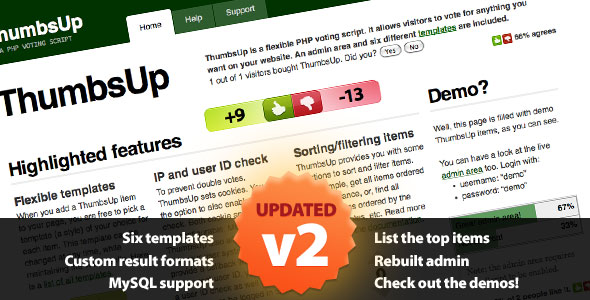
ThumbsUp Ratings & Charts is a PHP voting script that adds up/down voting to any item on a website — blog posts, products, comments, images, or anything else that needs a score. It ships with an admin panel for managing vote items and six front-end templates, and it is aimed at developers or site owners who want a self-hosted voting system rather than a third-party widget. The script is sold on CodeCanyon for $17 and has been purchased roughly 2,000 times.
The product comes from developer GeertDD, who has kept the codebase in clean object-oriented PHP with heavy commenting. That matters for a script in this price bracket, because the practical question with any voting add-on is not whether it works out of the box but whether it can be bent to fit an existing site. ThumbsUp is built to be modified, and the vendor provides the layered Photoshop files for the templates so colours and gloss effects can be adjusted without reverse-engineering the CSS.
What the voting script actually does
At its core, ThumbsUp stores a vote against a named item and returns a count. The interesting part is how much of that process is exposed for configuration.
Voting on arbitrary content types
Items are not tied to WordPress posts or WooCommerce products. A site owner defines an item, gives it a name, and the script handles the rest. That means the same installation can run a thumbs-up counter on a portfolio gallery, a helpfulness rating on knowledge base articles, and a simple approval tally on user-submitted comments. The flexibility is the main selling point: the script does not assume a content management system.
An admin area for day-to-day control
The back end was rebuilt in version 2.0 and is AJAX-powered, so closing, reopening, renaming, resetting or deleting an item happens without a page reload. Closing an item stops new votes while keeping the existing score visible, which is useful for time-limited polls or for freezing results once a decision has been made. Resetting clears the tally without destroying the item, so a recurring vote can be reused each month.
Result display and leaderboards
Custom result formats let the output be shaped to match a site’s design rather than being locked to a single widget style. The script can also list top items, which turns a collection of individual votes into a ranked leaderboard — a common requirement for “most helpful article” or “top submission” sections. Six templates are included, and the template system is extensible, so a seventh can be added without touching core logic.
Two-option polls and IP handling
A dedicated mini-poll template handles simple binary questions with configurable text and colours, which covers the lightweight poll use case without a separate plugin. On the integrity side, version 2.1 added the ability to block specific IP addresses from voting, and version 2.0 introduced an IP lifetime setting that controls how long a visitor’s vote record persists. Neither is a substitute for a full fraud-prevention system, but both raise the effort required to stuff a ballot box.
Integration with an existing user system
Version 2.0 added basic integration with existing user accounts. This is described as basic by the vendor, and that is worth taking at face value: it is a hook for tying votes to logged-in users, not a complete membership solution. Sites that already have authentication can use it to prevent duplicate voting by the same account; sites without one will rely on the IP controls instead.
Where ThumbsUp fits, and where it does not
The strongest fit is a custom PHP application that already has its own content model. If a site is built on bespoke code and needs a voting layer, dropping in a self-contained script with a config file is far less disruptive than installing a CMS plugin that assumes a particular database schema. The same applies to static-ish sites with a small dynamic component, where a full CMS would be overkill.
It also suits agencies building small interactive features for clients: a feedback widget on a documentation site, a “was this useful?” control on support pages, or a ranked list of community submissions. The $17 price and the permissive approach to modification make it cheap to evaluate on a single project.
The wrong choice is a WordPress site. ThumbsUp is a standalone PHP script, not a plugin, and running it alongside WordPress means maintaining two systems and two sets of templates where a native plugin would do the job in a few clicks. It is also a poor fit for anyone who wants a hosted, zero-maintenance rating widget — this is software that has to be installed, configured and kept patched. Finally, projects needing sophisticated anti-fraud logic, such as weighting votes by account age or detecting coordinated voting patterns, will find the IP-based controls too blunt.
Strengths and limitations
Strengths
- Genuinely content-agnostic: votes attach to named items, so the script works with any data structure a site already has.
- Well-commented object-oriented PHP makes modification realistic for a developer who did not write it.
- The admin panel covers the operations that matter day to day — close, reopen, rename, reset, delete — without page reloads.
- Six templates plus an extensible template system, with layered Photoshop source files supplied for visual tweaks.
- Broad browser support declared, including older Internet Explorer versions, which matters for institutional or corporate audiences.
- A track record: 351 reviews averaging 4.46 out of 5 is a meaningful sample for a script at this price.
Limitations
- The last vendor update is dated July 2020. That is a long gap for software that runs on a public-facing server, and buyers should assume they are responsible for their own security review and PHP compatibility testing going forward.
- Requirements are modest but specific: PHP with PDO and a database such as MySQL. The vendor explicitly advises checking system requirements before purchase, which suggests support requests about environment mismatches have been common.
- The user-system integration is described by the vendor as basic. It is not a turnkey way to enforce one-vote-per-account across a complex membership setup.
- Duplicate-vote prevention leans on IP address tracking, which is unreliable behind shared networks, corporate proxies and mobile carriers that rotate addresses.
- No high-resolution assets are included in the package, so anyone rebuilding the templates for retina displays will be recreating graphics rather than exporting them.
- Installation is described as easy but assumes basic web development skills — this is not a script for a non-technical site owner.
How it compares with the wider category
Voting and rating tools fall into three broad groups: hosted widgets, CMS plugins, and standalone scripts. Hosted widgets are the least effort — paste a snippet and go — but they put vote data on someone else’s servers, often load external assets, and typically charge monthly. CMS plugins are the natural choice when the site already runs WordPress or similar, because they inherit the platform’s user accounts and content types.
ThumbsUp sits firmly in the standalone script group, and within that group its differentiator is configurability rather than polish. It does not try to be a survey platform or a full feedback suite; it does one thing — count votes on named items — and exposes enough settings to make that useful in different contexts. Compared with hosted options it offers data ownership and no recurring fee. Compared with CMS plugins it offers independence from a platform but loses the convenience of automatic integration. The trade is control for convenience, and whether that is worth it depends entirely on whether the site already has a custom back end.
Frequently Asked Questions
Does ThumbsUp work with WordPress?
No, not natively. ThumbsUp is a standalone PHP script rather than a WordPress plugin, so it does not install through the WordPress admin or inherit WordPress users and posts. Running it on a WordPress site is technically possible but means maintaining a separate application alongside the CMS. For WordPress sites, a dedicated rating plugin is almost always the more sensible route.
What are the server requirements for ThumbsUp?
It needs PHP with the PDO extension and a database, with MySQL supported. The vendor lists compatibility with PHP 5.x and 7.x and MySQL 4.x and 5.x. Because those version ranges are older, buyers should verify their hosting environment before purchase — the vendor explicitly recommends checking system requirements first, and newer PHP releases are not covered by the stated compatibility list.
Can ThumbsUp stop the same person voting twice?
Partially. The script records votes against IP addresses, with a configurable IP lifetime setting, and version 2.1 added the ability to block specific addresses outright. This raises the barrier to casual repeat voting but is not reliable against shared networks, proxies, or users on mobile connections whose addresses change. Sites needing strict one-vote-per-account enforcement should use the user-system integration instead.
Is ThumbsUp still maintained?
The most recent update recorded for the product is from July 2020, so active development appears to have stopped. That does not make the script unusable — it is a small, self-contained tool — but it does shift responsibility onto the buyer. Anyone deploying it should review the code, test it against their PHP version, and be prepared to handle security patches themselves rather than expecting vendor releases.
Verdict
ThumbsUp Ratings & Charts is worth buying for developers building or extending a custom PHP site who need a voting layer they can shape to their own content model. The clean, commented code, the extensible template system and the practical admin panel justify the $17 many times over on a single project, and the 4.46 rating across 351 reviews suggests buyers generally get what the listing promises. It is the wrong purchase for WordPress users, for non-technical site owners, and for anyone who needs ongoing vendor maintenance or robust fraud detection. The 2020 update date is the deciding factor for risk-averse buyers: treat this as a solid starting point to be owned and maintained in-house, not as a product with a support roadmap behind it.