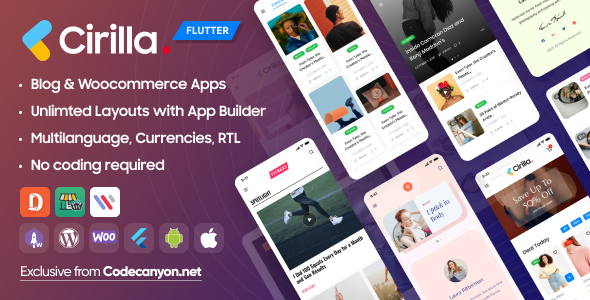
Cirilla Flutter is a source-code template that turns a WordPress and WooCommerce store into a native mobile app for Android and iOS. It pairs a Flutter front end with a WordPress plugin called App Builder, which lets store owners rearrange screens and layouts from the dashboard rather than editing Dart code. It suits shop owners, freelancers and agencies that already run WooCommerce and want a branded app without building one from scratch.
What Cirilla actually does beyond wrapping a store in a web view
The core idea is that the app is a real Flutter application, not a browser shell pointed at a mobile site. The vendor supplies the full Dart source, along with native project files for both platforms, so a developer can compile and extend it. That distinction matters: a genuine native build can use device features, cache content locally and present interfaces a responsive theme cannot.
The App Builder plugin is the part most buyers will judge the product on. It works like a page builder inside WordPress, but its preview canvas is a phone screen. Layouts are assembled from widgets — product lists, category grids, post feeds, vendor widgets for multi-vendor marketplaces, sidebars and custom tabs — and saved server-side. The vendor states that design changes can be pushed without resubmitting to the App Store or Google Play, which is a meaningful operational advantage because those review cycles can take days.
Several capabilities stand out as more than checkbox features:
- Cart synchronisation with WooCommerce. Carts are shared with the WordPress store, including coupon handling, shipping selection and merging a guest cart into a registered account. This is the hardest part of any WooCommerce app to get right, and it is where cheap templates usually fall apart.
- Video shopping. A vertical, swipeable video feed in the style of short-form social apps, with play, pause, like, share and an in-feed buy action. It is a merchandising format rather than a checkout feature, and it only pays off if the store already produces video.
- Query Data Selector. A rule-based tool for pulling specific values out of product or post data and binding them to labels or images. In practice it lets non-developers build dynamic screens — for example, surfacing a custom field as a badge — without writing template logic.
- Prebuilt templates and screens. The vendor ships importable layout templates plus ready-made screens for login and registration, contact, category listings and product detail, with multiple layout styles for product pages.
- Everyday app plumbing. Push notifications, multi-language support, dark mode and payment gateways handled through a web view are all present, which means fewer gaps to fill before launch.
The developer behind the product is appcheap, and the item has accumulated 1,945 sales with a 4.91 out of 5 rating across 133 reviews — a volume of feedback large enough that the score carries some weight. The listing also references a separate cloud build service, billed by the vendor and not included in the purchase price, for buyers who would rather not install the Flutter toolchain locally. The vendor does not state what that service costs on the item page.
Where Cirilla fits, and where it does not
The clearest fit is an existing WooCommerce store with a catalogue of physical or digital goods and a reason to want a home-screen presence: repeat-purchase groceries, cosmetics, food ordering, or a niche shop competing on convenience. A single-vendor store can use it as a straightforward shopping app; a marketplace running WooCommerce with multiple sellers can use the vendor widgets and multi-vendor detail screens to give each seller a storefront inside the app.
It also works for content-led projects. The post feeds, category screens and custom tab builder make it plausible for a news or magazine site, a podcast or radio station, or a brand publishing articles alongside products. Agencies have a further use case: keeping one codebase and one builder workflow to deliver apps for several clients, which is the economics the vendor is selling with its “save 4000 hours” claim.
The wrong choice is equally clear. Anyone without WordPress, or without WooCommerce for the commerce features, gets little from this. So does a team that wants a fully custom, hand-built app with its own backend — Cirilla is opinionated about where data comes from, and fighting that structure costs more than starting fresh. A store with a very small catalogue and no repeat-purchase behaviour will usually get better returns from a well-optimised mobile site than from a native app with its own install friction.
Strengths and limitations in plain terms
Strengths
- Full Flutter source code with a lifetime download and update entitlement, so the app is genuinely owned rather than rented.
- Layout changes through App Builder avoid app store resubmission, which shortens the iteration loop considerably.
- Deep WooCommerce integration — cart sync, coupons, shipping, guest-to-account cart merging — covers the parts that most often break in template apps.
- Broad file delivery: Dart, YAML, native Android and iOS project files, plus layered design assets, which reduces the design work an agency has to redo.
- Strong review record at scale, and the vendor states the product is kept current with recent Flutter and WooCommerce releases.
Limitations
- Launching still requires an Apple Developer account, a Google Play account, signing certificates and store review. The builder removes design friction, not publishing work.
- Building the app locally needs a working Flutter environment; the alternative cloud build is an extra, separately priced service.
- Payment gateways routed through a web view can feel less native than in-app payment flows, and some gateways restrict embedded checkout, so the exact gateway mix needs checking before committing.
- Features such as video shopping and Query Data Selector add configuration surface. Buyers wanting a five-screen shop will be paying for capability they will not use.
- The vendor’s changelog dates and version numbers on the listing are inconsistent, which makes it worth confirming the current release directly before purchase.
How it compares with the wider category of WooCommerce app templates
Most products in this space sit at one of two poles. At one end are thin wrappers that load the mobile site in a web view; they are cheap and fast to ship but inherit every limitation of a browser, including sluggish navigation and no offline behaviour. At the other end are custom development shops quoting project fees that dwarf a template licence. Cirilla positions itself in the middle: native Flutter output with a visual configuration layer on top.
Against web-view wrappers, the difference is real but conditional. A store that only needs push notifications and a home-screen icon may not notice the benefit. A store that wants video feeds, custom tab structures or a tuned product detail layout will. Against bespoke development, the trade-off is control: Cirilla’s builder defines what can be changed without code, and anything outside that boundary becomes a Flutter development task again — which is fine for an agency, less so for a non-technical owner.
The other axis is the builder itself. Competing templates often require a rebuild and a store resubmission for every layout change. Server-driven layout is the single strongest argument for this product over its neighbours, and it is the feature worth testing hardest in the live demo before buying.
Frequently Asked Questions
Do I need to know Flutter to use Cirilla?
No, not for day-to-day operation. Layouts, screens and content are configured through the App Builder plugin inside WordPress, and the vendor explicitly targets users with no coding background. Flutter knowledge becomes necessary only for custom features outside the builder, or for compiling and signing the app locally if the cloud build service is not used.
Does Cirilla work with any WordPress theme?
It works alongside WordPress and WooCommerce rather than replacing them, so the app reads store data through the plugins. The vendor does not state a hard theme requirement, but because the app renders its own layouts, the site theme mainly affects the web storefront. Unusual product types or heavy custom-field setups are worth testing in the demo first.
Can app designs be changed without resubmitting to the app stores?
Yes. The vendor states that App Builder changes are applied without republishing, because the app fetches its layout configuration from the WordPress site. This is the product’s main operational advantage. Store submissions are still required for the initial release and for changes to native code, permissions or the app binary itself.
Is the cloud build service included in the price?
No. The $69 item price covers the Flutter source code, the WordPress plugins and lifetime updates. The cloud build service, which compiles the app on the vendor’s servers instead of a local Flutter installation, is charged separately and priced on the vendor’s own page. Buyers with a local Flutter setup do not need it at all.
Verdict
Cirilla earns its rating through completeness rather than novelty: cart sync, a server-driven builder, full source code and a wide set of prebuilt screens add up to a template that can plausibly reach production. It is the right purchase for WooCommerce store owners with repeat customers, for agencies delivering multiple apps on one workflow, and for developers who want a Flutter starting point they can extend. It is the wrong purchase for anyone outside WordPress, for teams wanting a fully bespoke architecture, and for small catalogue stores where a fast mobile site already does the job. The $69 outlay is modest against the build time it saves, provided the buyer budgets for developer accounts, store review and possibly the cloud build service.