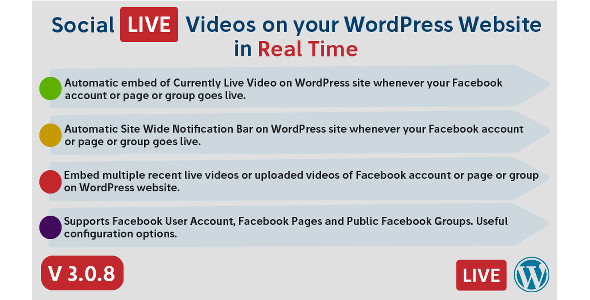
Social Live Video Auto Embed for WordPress Media is a plugin that watches a Facebook profile, page or public group and places the live broadcast on a WordPress site automatically, without anyone pasting an embed code mid-stream. It also handles replays and uploaded videos through shortcodes, and can raise a site-wide notification bar the moment a broadcast starts. It suits publishers, churches, coaches, newsrooms and agencies that treat Facebook Live as a primary channel and want their own domain to reflect that in real time.
What the plugin actually does once it is installed
The core mechanic is a shortcode that acts as a placeholder rather than a fixed video. A site owner connects a Facebook source through the plugin’s settings, generates a shortcode for that source, and drops the shortcode into a post, page or widget area. When the source is live, the player appears in that spot. When it is not, the visitor sees whatever fallback text has been configured. That inversion — the page is written once and the content changes on its own — is the whole value proposition, and it is the part worth evaluating carefully.
Three separate embed types, not one
The plugin distinguishes between a currently live broadcast, a previously recorded live video, and an ordinary uploaded video. Each gets its own shortcode type, and each can carry its own maximum number of videos to display. That matters in practice: a church might want only the current stream on its homepage but the last six sermons on an archive page, and both can be handled from the same connected source without duplicating configuration.
Messaging control around the player
Every embed accepts a custom message shown above the player, plus separate alternate messages for the two inactive states — one for “not live right now” and one for “no recent recordings available.” Shortcodes are permitted inside those message fields, which means a fallback can point at a newsletter signup, a countdown, a related playlist or a contact form rather than sitting there as dead text. This is a small feature that quietly determines whether an offline page looks intentional or broken.
The site-wide notification bar
A separate module displays a bar across the top of the site whenever the connected source goes live. It polls in the background, so the bar appears on a page a visitor already has open rather than requiring a refresh. Appearance is configurable, the bar can be made sticky, and it can be given a blinking effect — a detail some brands will want and most will not. The polling interval is fixed at 60 seconds according to the changelog, which is a reasonable compromise between responsiveness and server load.
Performance and presentation controls
Recorded and uploaded videos can be cached with a configurable refresh window, which reduces the number of calls made to Facebook’s API and, by extension, the risk of hitting rate limits. Player width is adjustable and the output is responsive by default. Fullscreen can be allowed or blocked for recorded and uploaded videos. The plugin can also render the full Facebook post around the player — description plus like, comment and share buttons — though Facebook has disabled that behaviour on mobile, so it is a desktop-only enhancement.
Where this fits, and where it does not
The strongest fit is an organisation whose audience already lives on Facebook and whose website needs to keep pace. A church streaming a Sunday service, a local news outlet covering council meetings, a fitness coach running weekly sessions, a musician doing listening parties — all of these benefit from a page that switches itself on when the broadcast begins. Agencies will find the multi-shortcode support useful for building a reusable template: one shortcode per client source, dropped into a page template, and the site is live-aware without custom development.
It is also a sensible choice for sites that want to keep recorded sessions on their own domain for search and archive purposes while still broadcasting through Facebook’s distribution. Because the shortcodes can repeat and multiple can sit in a single post, a single page can combine a live slot, a recent-replays grid and an uploaded-video section.
The wrong choice is any project where Facebook is not the broadcast home. The plugin connects to Facebook specifically; it does not ingest YouTube Live, Twitch, Vimeo or Instagram. A team that streams to YouTube and cross-posts to Facebook would be building the wrong integration. It is also a poor fit for sites that cannot run HTTPS or are locked to an old PHP version, since Facebook’s app requirements make SSL mandatory and the vendor states PHP 5.4 or later as the floor. And anyone uncomfortable creating and maintaining a Meta developer app — with the token renewals that implies — should weigh that overhead before buying.
Strengths and limitations
Strengths
- Genuinely automatic. The shortcode resolves to a live player without manual intervention, which removes the most common failure in live-video workflows: someone forgetting to update the page.
- Multiple source types. User profiles, pages and public groups are all supported, so a solo creator and a multi-admin organisation can use the same plugin.
- Thoughtful fallback handling. Separate offline messages for live and recorded states, with shortcode support, let a site look deliberate when nothing is streaming.
- Caching controls. A configurable cache window for recorded content is a real operational feature, not a checkbox — it directly reduces API pressure.
- Mature track record. Nearly 1,900 sales and a 4.96 average across 67 reviews is a strong signal for a CodeCanyon item in this category, and the changelog shows the developer, SleekAlgo, responding to Facebook API breakages over several years rather than abandoning the product.
- Current WordPress compatibility. The vendor lists support from WordPress 5.0 through 6.9.x, and the item was last updated in June 2026.
Limitations
- Facebook only. There is no support for other streaming platforms, so multi-platform broadcasters need a second solution.
- Meta app dependency. Setup requires a Facebook developer app and access tokens. Token expiry has caused problems before — the changelog records fixes for exactly that in 2020 — and any future Meta policy change can break the integration until the vendor ships an update.
- Fixed polling interval. The notification bar checks every 60 seconds with no user-facing control, so a broadcast can be up to a minute old before the bar appears.
- Desktop-only post wrapper. The like/comment/share block around the player does not appear on mobile, which limits its usefulness for social proof.
- Legacy browser claims. The listing cites Internet Explorer 8 through 11 as compatible, which says more about the age of the compatibility statement than about present-day relevance.
- No stated refund or support terms in the listing data. Buyers should check the vendor’s support policy on the marketplace page before purchasing.
How it compares with the wider category
Alternatives in this space generally fall into three groups: general-purpose video embed plugins that handle many platforms but treat live detection as an afterthought; social feed plugins that aggregate posts and happen to include video; and custom development using the Facebook Graph API directly. The first group offers breadth but rarely switches a placeholder into a live player on its own. The second often prioritises feed aesthetics over player reliability and can be heavy on page weight. Custom work gives full control but carries ongoing maintenance against a moving API.
This plugin sits in a narrower position: it does one platform, does it deeply, and prices at $99 as a one-off CodeCanyon purchase rather than a subscription. For a Facebook-first publisher, that specialisation is the point. For anyone needing two or three platforms under one roof, a broader embed plugin or a bespoke build will be less frustrating, even if it costs more effort upfront.
Frequently Asked Questions
Does this plugin work with Facebook Pages and Groups, or only personal profiles?
It supports all three. Personal profiles, pages the account owns, and public groups where the user is an administrator can each be connected and given their own shortcode. Private groups are not covered, which is consistent with Facebook’s own access rules for third-party applications.
What happens on the website when the Facebook page is not live?
Visitors see an alternate message instead of a player. The plugin provides two separate fallback fields — one for when the source is offline and one for when no recent recordings exist — and both accept WordPress shortcodes, so the offline state can promote a newsletter, a contact form or an archive.
Do I need a Facebook developer account to set it up?
Yes. The plugin connects through a Meta app, which requires creating one in Facebook’s developer portal and generating access tokens. The site must also run on HTTPS, since Facebook requires SSL for app login. Budget time for this step and expect to revisit it if tokens expire.
Can the same shortcode be used on more than one page?
Yes, and multiple different shortcodes can appear within a single post or page. That allows a homepage live slot, an archive of past broadcasts and an uploaded-video section to coexist, each pulling from the same connected source without separate configuration for every placement.
Verdict
Buy this if Facebook Live is a core part of how the audience is reached and the website needs to reflect broadcasts automatically — particularly for churches, local media, coaches and agencies managing several client sources. The combination of live detection, replay handling, sensible fallback messaging and a notification bar covers the whole workflow at a flat $99, and the sales and rating figures suggest it has been tested in the field. Do not buy it if broadcasts happen on YouTube, Twitch or Instagram, if the team cannot maintain a Meta developer app, or if the hosting environment cannot meet the HTTPS and PHP requirements. Multi-platform publishers should look at broader embed tools first.