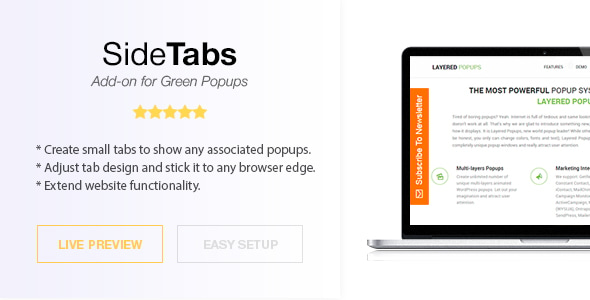
Side Tabs is a small WordPress plugin that adds fixed, clickable tabs to the edges of a website window, each one wired to an existing popup built with the Green Popups plugin. It is an extension rather than a standalone product: without Green Popups 7.0 or later already running, the add-on has nothing to open. Site owners who already use Green Popups and want a persistent, low-friction entry point to their popups — a contact form, a newsletter offer, a support panel — are the audience for this Side Tabs add-on from developer halfdata.
What the add-on actually adds to a Green Popups installation
The core idea is simple and worth stating plainly: a tab is a label pinned to the left or right edge of the browser viewport, and clicking it triggers a popup that has already been created elsewhere in the Green Popups admin. The tab is the trigger, not the content. That separation matters, because it means the popup itself can be edited, restyled or swapped out without touching the tab.
Several capabilities follow from that design:
- Multiple tabs per site. The plugin supports creating more than one tab in the admin area, so a site can run, for example, a newsletter tab on the right edge and a support tab on the left. Each tab is associated with a different popup.
- Sitewide or per-page placement. A default tab can be set globally from the settings screen, while individual posts and pages can override that choice from the page editor. This is the most useful part of the feature set for content-heavy sites, where a promotional tab belongs on some articles and not others.
- Icon-only tabs. A tab can be rendered without a text label, showing just an icon. That keeps the footprint narrow on smaller screens and suits designs where a word-mark would look intrusive.
- Role-based visibility. Tabs can be disabled for specific WordPress user roles. Logged-in customers or members can be spared an offer aimed at first-time visitors, which is a level of control many simple floating-button plugins do not offer.
- Multisite compatibility. The changelog records support for WordPress Multisite from version 1.44, so network installations are covered.
On the technical side, the package ships with JavaScript, CSS and PHP source files, and the vendor declares compatibility with WordPress 5.0 through 7.0.x and with Chrome, Firefox, Safari, Opera and Edge, plus Internet Explorer 10 and 11. The IE support is a legacy holdover rather than a selling point in current practice, but it signals the code has not been aggressively modernised into something that breaks on older browsers.
Where side tabs earn their place, and where they do not
The pattern suits sites that want a permanent, unobtrusive route into a conversion element. Common fits include:
- Lead-generation blogs and magazines that want a newsletter signup visible on every article without a modal interrupting the reading experience on page load.
- Service businesses running a contact or quote-request popup, where a tab labelled “Get a quote” sits quietly at the edge until someone needs it.
- Membership and course sites using role restrictions to show an upgrade tab only to free accounts.
- Agencies building client sites on Green Popups that want a reusable, configurable trigger rather than hand-coding a floating button for each project.
It is the wrong choice in a few clear cases. If a site does not already run Green Popups, buying this add-on means buying two products and migrating existing popups into a new system — a disproportionate amount of work for a single floating tab. Equally, sites with heavy mobile traffic should test carefully: edge tabs compete for space on narrow screens, and a tab that overlaps content or a sticky header is worse than no tab at all. Finally, anyone wanting a tab that opens a link, a slide-out cart or a chat widget rather than a Green Popups popup is looking at the wrong tool entirely.
Strengths and limitations in plain terms
Strengths
- Clean division between trigger and content, so popups can be revised without rebuilding tabs.
- Sitewide default plus per-page override gives genuine editorial control over where tabs appear.
- Role-based hiding is a practical feature that reduces annoyance for logged-in users.
- Very broad WordPress version support, from 5.0 through 7.0.x, which reduces upgrade anxiety on older installs.
- Established track record: 1,855 sales and a 4.65 out of 5 rating across 52 reviews.
- Source files included, so agencies can adjust styling to match a client’s design system.
- Low price relative to the development time of building the same behaviour by hand.
Limitations
- Hard dependency on Green Popups 7.0+. There is no standalone mode and no fallback, so the add-on is worthless without the parent plugin.
- Sparse changelog activity. The version history shows a gap between the 2020 release of version 2.00 and the vendor’s stated update in September 2026, with nothing documented in between. Buyers should confirm current behaviour against their WordPress version rather than assuming continuous maintenance.
- No stated accessibility provisions. The vendor does not describe keyboard focus handling, ARIA labelling or screen-reader behaviour for the tabs, so teams with accessibility obligations will need to audit the output themselves.
- Limited placement options. The listing describes sticking tabs to a window edge; it does not document offset, vertical position or responsive breakpoint controls, so fine-tuning may require CSS edits.
- Documentation is referenced but not detailed in the listing, and support is handled through the vendor’s contact channel rather than an integrated ticket system.
How it compares with the wider category of floating-tab and popup tools
Broadly, a buyer has three routes. The first is a general-purpose popup builder with its own floating-button or sticky-tab module — these tend to bundle more trigger types, analytics and A/B testing, at a higher price and with more configuration overhead. The second is a dedicated floating-button plugin, which typically handles links, phone numbers and chat rather than popups, and rarely offers role-based visibility or per-page overrides. The third is custom development: a small PHP and CSS snippet that renders a button and calls an existing popup function.
Side Tabs sits in a narrow gap between the second and third options. It is more capable than a typical floating-button plugin for this specific job, because the tab is bound to a real popup system with its own targeting rules, and it is cheaper and faster than custom code. The trade-off is specialisation: it does one thing, it does that thing only inside the Green Popups ecosystem, and it does not attempt analytics, scheduling or multi-trigger logic. For a Green Popups user, that focus is an advantage. For everyone else, the general-purpose builders remain the more sensible default.
Frequently Asked Questions
Do I need Green Popups installed to use Side Tabs?
Yes. Side Tabs is an add-on and will not function on its own. The vendor requires Green Popups version 7.0 or higher to be installed and active before the tabs can be created or displayed. Sites without that parent plugin should budget for both purchases, or choose a standalone floating-tab solution instead.
Can different pages show different side tabs?
Yes. A default tab is chosen on the plugin’s settings screen and applies sitewide, while the post and page editor lets an individual entry select a different tab. That means a homepage can carry a newsletter tab while a pricing page carries a quote-request tab, without any code changes.
Can side tabs be hidden from logged-in users?
Yes, by user role. The plugin includes an option to disable tabs for specific WordPress roles, so a tab promoting a signup offer can be suppressed for registered members while remaining visible to guests. This is configured per tab in the admin area rather than in theme code.
Does Side Tabs work with the latest WordPress versions?
The vendor lists compatibility up to WordPress 7.0.x and back to 5.0, which covers essentially every supported release. That said, the changelog shows little documented activity between 2020 and the vendor’s 2026 update, so testing on a staging copy before deploying to a live site is the prudent step.
Verdict
Buy Side Tabs if Green Popups is already part of the stack and the goal is a persistent, role-aware trigger that opens an existing popup without redesigning anything. The per-page overrides, icon-only mode and role restrictions are the features that justify the modest price over a hand-rolled button. Skip it if Green Popups is not installed, if the requirement is a link or chat launcher rather than a popup, or if strict accessibility compliance must be documented by the vendor. The 1,855 sales and 4.65 rating suggest the add-on does its job reliably for the audience it was built for; the thin changelog is the main reason to verify against a current WordPress install first.