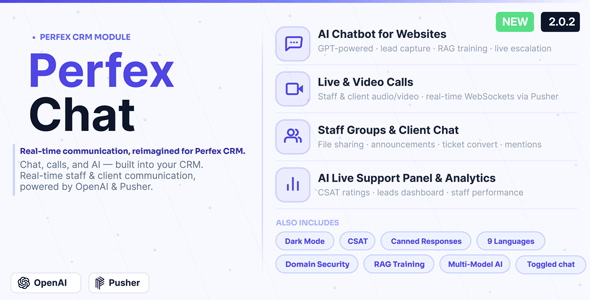
Perfex CRM Chat is a commercial add-on module for Perfex CRM, an open-source customer relationship management system built on the CodeIgniter PHP framework. It adds a complete communications layer to Perfex: real-time internal messaging between staff, direct chat with clients, group conversations, an embeddable AI chatbot for website visitors, WebRTC voice and video calling, and a live support panel with satisfaction reporting. It is aimed at agencies, freelancers and small service businesses that already run Perfex CRM and want chat, lead capture and support handled inside the same system rather than in a separate helpdesk tool. The module is sold on CodeCanyon by the developer i-Dev for $69 and has 1,829 sales with a 4.64 out of 5 rating across 78 reviews.
What the module actually adds to a Perfex installation
The core of the product is a messaging system that runs on Pusher WebSockets. WebSockets are a persistent connection between the browser and a server, which means messages arrive the moment they are sent instead of the page checking for updates on a timer. In practice that removes the refresh delay that makes many CRM chat tools feel sluggish, and it lowers server load compared with polling.
On top of that transport layer sit the features most teams will use daily:
- Three conversation types in one inbox. Staff can message colleagues privately, message clients and contacts directly, or work in unlimited group threads with add-and-remove members and renaming. Because all three share the same interface, a support agent does not have to switch tools between an internal question and a client reply.
- Message handling that matches consumer chat apps. Read receipts with sent, delivered and seen states, typing indicators, online presence, emoji reactions, @mentions, forwarding, inline editing, message search and audio clips. These are small things individually, but their absence is what usually pushes staff back to Slack or WhatsApp.
- Rich media without leaving the CRM. Drag-and-drop file and image uploads, pasting screenshots from the clipboard, and in-chat previews for images, video, MP3 and embedded YouTube or Vimeo links. A shared gallery collects files sent in a conversation, which helps when someone needs last month’s signed document.
- Broadcast announcements. Admins can push a message to every staff member or every client at once, useful for maintenance windows, policy changes or seasonal notices.
- Quick references to CRM records. The quick-mention tool inserts links to projects, invoices, estimates and contracts into a message, so a discussion can point at the actual record instead of a description of it.
- Chat-to-CRM conversion. A staff, client or group conversation can be turned into a native Task, Ticket, Lead, Project or Contract, with selectable messages carried across. This is the feature that most justifies the module’s existence: a conversation that produces work becomes a tracked record rather than a scrollback nobody revisits.
The website chatbot and live support widget
The second half of the product is a chat widget that can be embedded on any website, not just inside the CRM. Visitors get answers from a knowledge base the business trains itself, and when the bot cannot help, the conversation escalates to live staff inside Perfex. Training material can be entered as question-and-answer pairs or imported from .xls and .xlsx spreadsheets, including all sheets in a workbook.
Version 2.0.2 added several refinements worth noting. Up to five Q&A chips can be pinned to the widget in a chosen order, and tapping one returns a stored answer instantly without calling the AI, which is faster and cheaper for common questions. Translations can be generated in a single step when a Q&A entry is created, edited per row, or regenerated across all languages from the source. The widget supports 12 languages, with Romanian and Bulgarian added in this release. A visitor-language mode lets the bot answer in the visitor’s own language even when the training content is written in only one, and the launcher button can be set to glow, wiggle or bounce with an optional teaser message beside it.
Live support includes CSAT analytics, the standard satisfaction score collected after a conversation. The vendor does not state how the reporting is presented or how long conversation data is retained, so buyers who need audit trails should check the demo before committing.
Where this module fits, and where it does not
The clearest fit is a service business already using Perfex as its system of record. A small agency with five to thirty staff can consolidate internal chat, client messaging and website enquiries into one place, and every conversation sits next to the client’s projects, invoices and tickets. The chat-to-ticket conversion is particularly useful for support teams, because a visitor’s widget conversation can become a logged ticket with the relevant messages attached.
Freelancers and consultancies that field pre-sales questions from a website will get value from the chatbot with lead capture, since enquiries arrive inside the CRM rather than in a separate inbox that has to be checked and re-keyed. Businesses operating in several languages benefit from the multilingual widget, which lets a single-language knowledge base serve visitors writing in other languages.
It is the wrong choice in a few clear cases. Organisations that do not run Perfex CRM should not consider it at all, because it is a module, not a standalone product, and it requires Perfex 3.0.0 or higher. Teams already standardised on a dedicated helpdesk platform with SLA management, advanced routing and deep reporting will find this module lighter than those tools and should not expect it to replace them. And anyone wanting a fully managed chat service with no WebSocket account to configure should weigh that setup cost, since the real-time layer depends on Pusher credentials.
Strengths and limitations
Strengths
- Genuinely broad scope for the price: internal chat, client chat, groups, chatbot, voice and video, and live support in one $69 module.
- WebSocket delivery removes polling, so conversations feel immediate and the server is not hammered by repeated requests.
- Chat-to-CRM conversion creates real Tasks, Tickets, Leads, Projects and Contracts, which is the difference between a chat tool and a CRM feature.
- Strong multilingual handling, including answering in the visitor’s language from single-language training data.
- Source files are included (PHP, JavaScript, HTML, CSS, SQL), so agencies can extend or restyle the module.
- Established track record on CodeCanyon and a recent update, which suggests active maintenance rather than abandonment.
Limitations
- Real-time messaging depends on a Pusher account, so there is an external service to configure and a third-party dependency outside the vendor’s control.
- The module is tied to Perfex 3.0.0 or higher and to the CodeIgniter stack, so it cannot be reused elsewhere and major Perfex upgrades carry compatibility risk.
- Browser support is listed as Firefox, Chrome and Edge only; Safari is not declared, which matters for client-facing chat where visitors use whatever they have.
- CSAT analytics are mentioned but the depth of reporting is not documented, so teams needing detailed support metrics should verify this in the demo.
- The AI chatbot answers from a knowledge base the buyer must build and maintain; it is not a self-training assistant, and stale content will produce poor answers.
How it compares with the wider category of CRM chat add-ons
Most chat add-ons for CRM platforms fall into one of two groups. The first is internal messaging only: staff chat bolted onto a CRM with no client-facing side. The second is a website widget that pipes visitors into a support inbox but does nothing for internal communication. Perfex CRM Chat deliberately spans both, and adds voice and video calling on top, which is unusual at this price point. Buyers comparing options should ask three questions: does the tool cover both internal and external conversations, does it write back into CRM records rather than sitting in its own silo, and what external services does it require. This module answers the first two strongly and the third honestly, since Pusher is required.
Against dedicated helpdesk platforms, the trade-off is depth versus integration. Standalone helpdesks offer more sophisticated routing, SLA rules and reporting, but they duplicate the client data already in Perfex. Against free or low-cost chat widgets, this module wins on CRM integration but requires an existing Perfex installation to be useful at all. It occupies a sensible middle ground for businesses that want one system rather than three.
Frequently Asked Questions
Does Perfex CRM Chat work without Perfex CRM installed?
No. Perfex CRM Chat is an add-on module and requires Perfex CRM version 3.0.0 or higher to function. It extends an existing installation rather than running as a separate application. Buyers who do not already use Perfex would need to purchase and set up the CRM first, which changes the total cost considerably.
Do I need a Pusher account to use the real-time chat?
Yes, the real-time messaging is built on Pusher WebSockets, which is a third-party service that requires its own account and credentials. The vendor describes zero server polling as a benefit of this design. Buyers should factor in Pusher’s own pricing tiers, which scale with concurrent connections and message volume.
Can the chatbot answer visitors in a language I have not trained it in?
Yes, within limits. The module can match a visitor’s question to knowledge stored in the widget’s configured language and reply in the visitor’s language automatically. Translation tools are also provided for Q&A entries. Accuracy still depends on the quality and coverage of the underlying training content rather than on the translation alone.
Can a chat conversation become a support ticket or lead?
Yes. Staff, client and group conversations can be converted into native Perfex records, including Tasks, Tickets, Leads, Projects and Contracts, with the option to select which messages carry across. This keeps the outcome of a conversation inside the CRM’s normal workflow instead of leaving it in a chat log.
Verdict
Perfex CRM Chat is a well-scoped purchase for businesses that already run Perfex CRM and want internal messaging, client chat, a website chatbot and live support in one place. The chat-to-record conversion and the multilingual widget are the features that earn their keep, and the 1,829 sales with a 4.64 rating suggest the module is stable in real use. Buyers should go in knowing about the Pusher dependency, the absence of declared Safari support and the work involved in maintaining chatbot training content. Teams without Perfex, or those needing enterprise-grade helpdesk routing and reporting, should look elsewhere. For everyone else in the Perfex ecosystem, it is a sensible consolidation rather than an impulse buy.