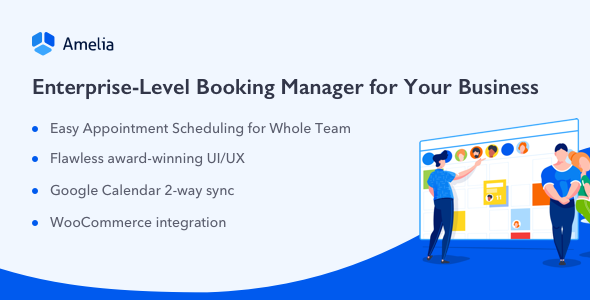
Amelia is a commercial WordPress plugin for scheduling appointments, classes and events, sold on CodeCanyon for $299 under the Amelia Calendars listing. It combines a customer-facing booking interface with a staff-side calendar, employee management, payment collection and calendar syncing, so a salon, clinic or consultancy can take bookings around the clock without a receptionist. It suits businesses that sell time slots and need more than a basic form, and it is built by melograno-ventures, with 2,054 sales and a 4.77 out of 5 rating across 132 reviews.
What Amelia actually does beyond a booking form
The core of the product is a booking flow that customers use on the front end of a WordPress site. Two presentation styles are available: a step-by-step wizard and a catalog view. The wizard walks a visitor through service, employee, date and time in a single fast-loading page, while the catalog view lists services or categories on one page so separate WordPress pages are not needed for each offering. Both are inserted with a shortcode, which is the standard WordPress method for placing a plugin’s output inside a page or post.
Scheduling logic is where the plugin carries most of its weight. Each employee can hold their own services, working hours, breaks and days off, and the system supports multiple business locations with staff assigned to specific sites. Services are organised into categories and can carry a price, a duration, a capacity for group bookings, and buffer time before and after an appointment so back-to-back slots do not collide. Recurring appointments can repeat daily, weekly, monthly or yearly, and special days can be given custom schedules that override the normal week.
Payments are handled in three ways. On-site payment records a booking without an online transaction, which suits businesses that collect in person. Stripe and PayPal are both integrated, each with a sandbox or demo mode so transactions can be tested before going live. Extras and upsells let a customer attach additional items to a booking, such as a meal, a ticket or an add-on service, which is a practical way to raise the average value of each appointment without a second checkout.
Behind the scenes, the admin calendar can be viewed by day, week or month, with list and timeline layouts for a denser overview. A dashboard reports bookings and key performance indicators. Google Calendar syncs both ways for each employee, so a staff member’s personal calendar stays aligned with the booking system, and Zoom is integrated for online appointments and events. Real-time SMS notifications and reminders go to both customers and employees. Separate employee and customer panels let people manage their own bookings from the front end rather than through the WordPress dashboard.
The commercial integrations matter for anyone selling through WordPress: WooCommerce support means bookings can connect to an existing shop, and the plugin is Gutenberg-optimized, meaning it works with the block editor that ships with modern WordPress. Source files are included in JavaScript, HTML, CSS and PHP, so a development team can modify behaviour rather than work only through settings screens.
Where Amelia fits well, and where it does not
The strongest fit is a service business with staff. Salons, barbers, spas, clinics, dental practices, therapists, photographers and tutors all share the same problem: several people, several calendars, and customers who want to see real availability. Per-employee hours, days off, locations and two-way Google Calendar sync address that directly. Group capacity and recurring appointments extend the same model to classes, workshops and regular sessions, which is why the plugin also appears in fitness, training and events contexts.
A second good fit is an agency or freelancer building booking sites for clients. The shortcode approach, catalog view and front-end panels mean a site can be assembled without custom templates, and the included source files give a developer room to restyle or extend. The price of $299 is a one-off licence cost rather than a subscription, which matters when a client expects a fixed build budget.
The wrong choice is a single-person operation that needs nothing more than a simple “pick a time” widget on a contact page. The feature set here is deep, and depth has a cost in configuration time and in the number of settings a site owner has to understand. A solo consultant with one service and one calendar will pay for employee management, locations and capacity controls they will never use. The same applies to a business that needs no payments and no staff scheduling at all.
Strengths and limitations
Strengths
- Genuine multi-employee scheduling, with individual hours, breaks, days off and location assignments rather than a single shared calendar.
- Two distinct front-end booking experiences — a guided wizard and a catalog view — so the same plugin can suit a quick single-service booking or a browsable menu of offerings.
- Payments built in through Stripe and PayPal, each testable in sandbox mode before launch, plus on-site payment tracking for businesses that collect in person.
- Two-way Google Calendar sync per employee and Zoom integration, covering both the internal calendar problem and the remote appointment case.
- Source files included, which is unusual at this price point and gives developers a real path to customisation.
- Established track record: 2,054 sales and a 4.77 average from 132 reviews is a meaningful sample, not a handful of early ratings.
Limitations
- The $299 price is a significant outlay for a single-site small business, and it sits well above the typical cost of a basic booking plugin. Buyers should confirm what the licence covers for their number of sites before purchasing.
- Configuration is broad, and the vendor’s claim that setup is straightforward should be read alongside the feature list: a multi-location, multi-employee setup with payments and calendar sync involves real decisions about services, buffers, capacities and staff hours before the first booking is taken.
- Recurring appointments are offered with daily, weekly, monthly and yearly schedules, but the listing does not state how exceptions to a recurring series are handled, so anyone relying on frequent one-off changes should test that in the demo first.
- The vendor states compatibility with WordPress 7.0.x and lists IE11 among supported browsers. The Internet Explorer reference is a legacy detail that says little about current browser testing.
- Support terms and the length of the support period are not specified in the listing; the vendor invites buyers to ask about pricing and support directly, which means those details need confirming before purchase.
How it compares with other booking options
Appointment plugins generally fall into three groups. The first is lightweight form-based tools that capture a request and email it to the business; they are cheap and quick, but availability is not real and staff still confirm by hand. Amelia is not in that group. The second is dedicated scheduling platforms sold as monthly subscriptions, often hosted outside WordPress. Those tend to be polished and low-maintenance, but they move booking data off the site and add a recurring cost. Amelia sits in the third group: self-hosted WordPress plugins that attempt to cover the whole scheduling workflow inside the site.
Against the lightweight end, the difference is capability rather than price. Multi-employee calendars, capacity, locations, payments and calendar sync are the features that separate a real booking system from a contact form, and Amelia includes all of them in one licence. Against subscription platforms, the trade-off runs the other way: Amelia avoids a monthly fee and keeps data on the WordPress install, but the site owner carries responsibility for hosting, updates and compatibility with other plugins. Against other self-hosted booking plugins, the distinguishing points are the breadth of the feature set, the included source files and the size of the review base. Buyers comparing on capability alone will find Amelia near the top of the category; buyers comparing on simplicity will not.
Frequently Asked Questions
What is Amelia Calendars used for?
Amelia Calendars is a WordPress plugin for taking appointments, classes and event bookings on a website. It provides a front-end booking interface plus a staff-side calendar, and adds employee scheduling, service categories, payments, SMS reminders, Google Calendar sync and Zoom integration. Businesses that sell time slots use it to accept bookings automatically instead of handling them by phone or email.
Does Amelia work with Google Calendar and Zoom?
Yes. The plugin supports two-way Google Calendar integration for each employee, so bookings appear in personal calendars and changes flow back. Zoom is integrated for online appointments and events, which lets a business offer remote sessions without a separate tool. Both are configured per employee, which matters for teams where only some staff take online meetings.
Can Amelia take payments when a customer books?
Yes. Stripe and PayPal are both built in, and each offers a test mode so transactions can be checked before going live. Businesses that prefer to collect in person can use on-site payment, which records the booking and tracks payment data inside the plugin. Extras and upsells can be attached to a booking to increase its value.
Is Amelia suitable for a single-person business?
It can be, but it is more than most solo operators need. The plugin’s strengths are multi-employee scheduling, multiple locations, group capacity and staff panels. A one-person business with a single service and no staff will pay $299 for controls it will not use. A simpler, cheaper booking tool is usually the better fit in that case.
Verdict
Amelia is worth buying for service businesses with staff, multiple locations or a mix of appointments and bookable events, and for agencies building those sites for clients. The combination of per-employee scheduling, two front-end booking styles, built-in payments and calendar sync covers the whole workflow in one licence, and the sales and rating history suggests it holds up in real use. It is not the right purchase for a solo operator who needs a basic time-slot picker, or for anyone unwilling to spend time on configuration before launch. Buyers should confirm licence scope and support terms with the vendor first, since the listing does not state them. On capability, it earns its place at the top of the self-hosted booking category; on simplicity, it does not compete.