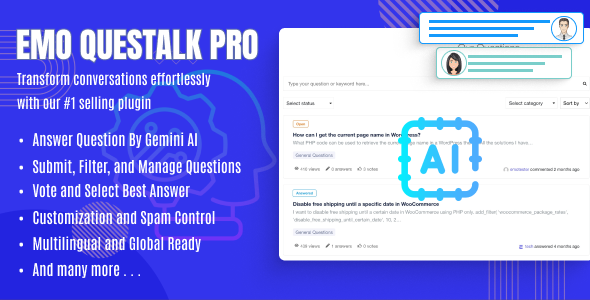
EMO Questalk Pro is a WordPress plugin that adds a full question-and-answer section to an existing site, letting visitors post questions, submit answers, vote, and build reputation profiles without leaving the WordPress dashboard. It is sold on CodeCanyon for $27 by the developer Emohelpdotcom, and at the time of writing it has recorded 2,534 sales with an average rating of 3.84 out of 5 across 81 reviews. It suits site owners who want a self-hosted knowledge community — a support forum, a niche Q&A board, or a documentation companion — rather than a hosted platform they do not control.
The plugin is a standalone Q&A system rather than a discussion board. That distinction matters: forums built on threaded topics reward conversation, while EMO Questalk Pro Forums are structured around a single question, a set of ranked answers, and a best-answer outcome. Anyone comparing the two formats before buying should understand which behaviour they actually want to encourage.
What EMO Questalk Pro Actually Does
The core of the plugin is a question listing page rendered through a shortcode, which means it can be dropped onto any WordPress page or post rather than being locked to a fixed URL structure. That listing ships with filtering, sorting, pagination and search, so a board with hundreds of questions stays navigable instead of becoming an endless scroll. Categories and tags sit underneath that, giving visitors more than one route to related content.
Question submission is handled by a dedicated form that can be placed on its own page or inside a sidebar. Posters supply a title, a longer description written in either HTML or Markdown, a category, and tags. Markdown support is a practical detail for technical audiences, who tend to write code snippets and formatted lists inside their questions and expect that formatting to survive publication.
Answers and comments accept the same two input formats, and the plugin adds a private mode for individual entries. That option lets a user submit something confidentially, which the vendor frames around sharing sensitive details such as server credentials. In practice this is what makes the plugin viable as a lightweight helpdesk: a customer can post a public question, then hand over login details privately within the same thread instead of moving to email.
Moderation is deliberately decentralised. Editing, deleting, pinning, following and changing a question’s status can all be done from the front end, so neither administrators nor trusted members need to open the WordPress admin to keep the board tidy. A reputation system and voting mechanisms sit on top of this, rewarding contributors and pushing stronger answers upward. The vendor also states that the plugin is optimised for the Gutenberg editor and ships with the original JavaScript, JSON, HTML, XML, CSS and PHP source files, which is useful for agencies that need to extend or restyle behaviour rather than fight it.
Where This Plugin Fits and Where It Does Not
The strongest fit is a content site that already attracts repeat visitors and wants to convert that traffic into participation. A software documentation site, a niche hobby blog, or a membership community can all use the Q&A section as a support layer that reduces repetitive email. The private answer mode and front-end moderation make it unusually well suited to small businesses running product support without a dedicated ticketing system.
It also works for agencies building client sites on WordPress. Because the source files are included and the plugin spans WordPress 4.9 through 6.8.x, it can be integrated into an existing theme rather than bolted on as a visually separate module. The wide version range is worth noting for anyone maintaining older installs.
Where it is the wrong choice is on a site with no existing audience. A Q&A board is empty until people use it, and an empty board looks worse than no board at all. Sites that expect questions to arrive without promotion, or that want threaded multi-topic discussion rather than discrete questions and answers, would be better served by a conventional forum plugin. Large communities with heavy concurrent traffic should also test performance carefully before committing, since the vendor does not publish load or scalability figures.
Strengths and Limitations
Strengths
- Shortcode-based placement gives control over where the board appears, and the listing includes search, filtering, sorting and pagination out of the box.
- Markdown and HTML support in both questions and answers suits technical and developer-oriented audiences.
- Private answer mode allows confidential information to be exchanged inside a public thread, which is rare in this category.
- Front-end moderation for editing, deleting, pinning, following and status changes reduces admin overhead.
- Voting and reputation systems provide the incentive structure that keeps community boards active.
- Source files are included, so the plugin can be customised rather than treated as a black box.
- Broad WordPress compatibility, from 4.9.x up to 6.8.x, and stated Gutenberg optimisation.
Limitations
- The rating sits at 3.84 out of 5 from 81 reviews. That is a workable score, but it indicates a meaningful minority of buyers hit problems the vendor has not fully resolved.
- The vendor does not publish documented hooks, filters or a REST API surface. Customisation may therefore require reading the supplied PHP directly rather than extending through official extension points.
- There is no stated figure for how many questions or concurrent users the board handles before performance degrades, so capacity has to be established by testing.
- Reputation, voting and moderation rules are described only in general terms. Buyers needing granular permission tiers or detailed anti-abuse controls should confirm the specifics before purchase.
- The plugin is a question-and-answer system, not a general discussion forum. Anyone expecting threaded topics, sub-forums or private messaging will find the model narrower than they need.
How It Compares With Other WordPress Q&A Options
WordPress site owners generally choose between three routes: a hosted community platform, a general-purpose forum plugin, or a dedicated Q&A plugin. Hosted platforms remove the maintenance burden but take the content and the audience relationship off-site, and pricing usually scales with membership. General forum plugins are more flexible in structure but typically require additional add-ons to reach the same voting, reputation and best-answer behaviour, and the combined cost and configuration effort rises accordingly.
Dedicated Q&A plugins occupy the middle ground, and EMO Questalk Pro competes there on breadth rather than polish. Its differentiators are the private answer mode, front-end moderation, and inclusion of source files — features that matter to support-oriented sites and to agencies doing custom work. Its weaker points are transparency around extensibility and documented performance limits. A buyer who needs a heavily customised, API-driven knowledge base may find the plugin’s boundaries harder to work within than a more openly documented alternative, while a buyer who simply wants a working Q&A section on a WordPress site will find the feature set complete for the price.
Frequently Asked Questions
Does EMO Questalk Pro require a separate forum theme or template?
No. The plugin renders its question listing and submission form through shortcodes that can be placed on any WordPress page, post or widget area. That means it inherits the active theme’s styling and layout rather than imposing its own template. The vendor states the plugin is Gutenberg-optimised and compatible with WordPress versions from 4.9.x through 6.8.x.
Can users post questions without accessing the WordPress admin area?
Yes. Question submission, answering, commenting and moderation all happen on the front end. Registered users can edit, delete, pin, follow and change the status of their own questions without entering the dashboard. Administrators retain oversight of the same actions, so moderation does not depend on backend access. The vendor describes this as decentralising member rights across the site.
Is EMO Questalk Pro suitable for handling support requests with sensitive details?
It can be. The answer and comment form includes a private mode that lets a user submit an entry confidentially rather than publicly. The vendor positions this around sharing sensitive information such as admin credentials or FTP details within a support thread. It is not a replacement for a full ticketing system, but it covers the common case of a customer needing to hand over access details.
What formats can be used when writing questions and answers?
Both HTML and Markdown are supported in question descriptions and in answer or comment entries. That allows formatted text, lists and code samples to be published without losing structure. Markdown is the more convenient option for technical users, while HTML gives finer control over layout. The choice is made per entry by the person writing it.
Verdict
EMO Questalk Pro is a sensible purchase for site owners who already have an audience and want a self-hosted Q&A layer they fully control — particularly support sites, documentation companions, and niche communities where private answers and front-end moderation solve real problems. Agencies building client sites will appreciate the included source files and the wide WordPress compatibility range. It is a poor fit for anyone starting from zero traffic, since an empty board helps nobody, and for projects needing threaded forum discussion, documented APIs, or proven high-traffic performance. The 3.84 rating from 81 reviews suggests a capable plugin with rough edges rather than a flawless one, so buyers with unusual requirements should test against the live demo before committing.