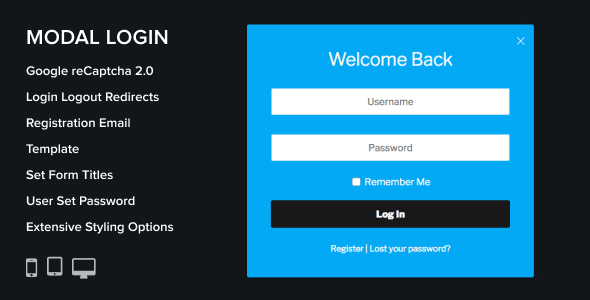
Modal Login Register Forgotten WordPress Plugin Membership is a small WordPress plugin from CodeCanyon that replaces the default WordPress login, registration and password-reset screens with pop-up modal forms. It is aimed at site owners who want a lighter, on-page sign-in experience without paying for a full membership suite. At $19 with 1,814 sales and a 4.08 average from 74 reviews, it occupies the budget end of the WordPress authentication market.
What the plugin actually changes on a WordPress site
The core idea is simple: instead of sending visitors to wp-login.php or wp-login.php?action=register, the plugin displays those forms in a layer on top of the current page. That keeps people inside the browsing context and removes one page load from the sign-up path.
The forms themselves are more configurable than the default WordPress equivalents. The registration form can include first and last name fields, and users can choose their own password at sign-up rather than receiving a system-generated one by email. That last point matters more than it sounds: the default WordPress flow emails a reset link, which is a common drop-off point for new accounts.
Several practical settings sit behind the forms:
- Redirect control after each action. Separate destination URLs can be set for login, logout and registration, so a new member can land on a welcome page or a members-only dashboard instead of the profile screen.
- Google reCAPTCHA on registration. A basic spam filter for the sign-up form, useful on sites that attract automated registrations.
- Editable registration email. The welcome message sent to new users can be rewritten, which allows the site’s tone and any onboarding instructions to be included from the first contact.
- Form titles and subtitles. Text above each form can be changed, so the wording matches the site rather than the plugin’s defaults.
- Colour pickers and layout options. Background, backdrop colour and opacity, border radius and centring are all adjustable, which is enough to blend the modal with most themes without writing CSS.
The plugin ships with its JavaScript, HTML, CSS and PHP source files, so a developer can modify behaviour directly rather than working around an encoded core. It is also translation-ready through Poedit, with instructions in the documentation. Browser support is declared for IE9 through Edge, and WordPress compatibility is listed from 4.8 up to 5.3.
Where this plugin fits, and where it does not
The strongest use case is a content site, blog or small brochure site that wants a tidier sign-in experience without committing to a membership framework. A site owner who has just added a comments policy, a download area or a newsletter-style account system gets a professional-looking modal for very little money and no dependency on a large plugin.
It also suits freelancers building a client site on a tight budget, particularly where the client has asked for custom redirects after login or a branded welcome email. Those are the two features most often requested in small builds, and this plugin exposes both without custom code.
It is the wrong choice for anyone who needs actual membership functionality. There is no content restriction, no user role management beyond what WordPress provides, no subscription billing and no member directory. A site selling access to courses, downloads or paid content needs a dedicated membership plugin; this one only handles the door, not what is behind it. It is also a poor fit for projects that must run on current WordPress releases, for reasons covered below.
Strengths and limitations in plain terms
Strengths
- Very low price for the feature set, with no recurring licence cost mentioned in the listing.
- Redirect settings for login, logout and registration cover the most common small-site requirements.
- Users set their own password at registration, which removes a known friction point in the default flow.
- Colour, backdrop and border-radius controls mean the modal can usually be matched to a theme without a developer.
- Source files are included, so the plugin can be extended or restyled at code level.
- Translation-ready, which is unusual at this price point.
- A track record of 1,814 sales and a 4.08 rating suggests the core function works for most buyers.
Limitations
- The most recent update listed by the vendor is December 2019, covering WordPress 5.3. Compatibility with later WordPress versions, the block editor and current PHP releases is not stated by the vendor, and that gap is significant for any site kept up to date.
- Only Google reCAPTCHA is offered for spam protection. There is no support for newer verification methods or for WordPress’s own registration hardening.
- There is no two-factor authentication, no login attempt limiting and no audit log, so it does not improve security beyond the default WordPress behaviour.
- Styling is controlled through fixed options rather than the block editor or theme.json, so sites built with modern full-site editing may need manual CSS to align the modal with site styles.
- The 4.08 rating implies a meaningful minority of buyers hit problems; the vendor lists support as Monday to Friday covering setup, features and bug fixes, but not customisation.
- No membership features at all despite the category label: no roles, no content protection, no payments.
How it compares with the wider authentication plugin category
WordPress authentication plugins fall into three rough groups: free utility plugins that restyle or secure the login screen, budget commercial plugins like this one, and full membership platforms that bundle login with access control and billing.
Against the free utilities, the case for paying $19 rests on the extra configuration: redirects per action, an editable welcome email, self-chosen passwords and colour controls in one settings screen. A site owner comfortable editing a child theme could replicate much of this, but the plugin saves the work.
Against full membership platforms, the comparison is not close, and it is not meant to be. Those products cost many times more and handle subscriptions, restricted content and member roles. This plugin does one job. Buyers should decide which job they actually have before comparing prices.
Against other budget modal-login plugins, the differentiator is maintenance. A plugin that has not been updated since 2019 is competing against alternatives that track current WordPress releases, and that is the single most important factor in this category.
Frequently Asked Questions
Does this plugin work with the latest version of WordPress?
The vendor does not confirm it. The listed compatibility stops at WordPress 5.3, and the most recent changelog entry is December 2019. It may still function on newer releases, but that is untested by the developer. Sites on current WordPress versions should test thoroughly on a staging copy before installing.
Can it restrict content to logged-in members?
No. The plugin only handles the login, registration and forgotten-password forms. It does not hide posts, pages or downloads from logged-out visitors, and it does not manage user roles or subscriptions. Content restriction requires a separate membership plugin, which can usually run alongside this one.
Is Google reCAPTCHA required to use the plugin?
No. reCAPTCHA is an optional setting for the registration form. Site owners who prefer a different spam approach, or none at all, can leave it disabled. The plugin does not add login attempt limiting or two-factor authentication, so other tools are needed if those are requirements.
Can the modal be styled to match an existing theme?
Partly. Colour pickers, backdrop colour and opacity, border radius and centre alignment are all adjustable from the settings. Anything beyond that, such as matching a specific theme’s typography or spacing, needs custom CSS. The included CSS and PHP source files make deeper changes possible for a developer.
Verdict
This is a sensible purchase for a small site owner or freelancer who wants a cleaner login and registration experience, custom redirects and a branded welcome email for under twenty dollars. It is also reasonable for a legacy site already running WordPress 5.x that will not be upgraded soon. It should be avoided by anyone building membership functionality, selling access to content, or running a site that must stay on current WordPress and PHP releases. The developer, SUHETO, has delivered a focused utility, but the long gap since the last update is a real risk that buyers should weigh against the low price.