DV Team Responsive Team Showcase WordPress Plugin is a commercial plugin from CodeCanyon that adds staff, member and people grids to a WordPress site using shortcodes and widgets rather than a page builder. It stores each person as a custom post with a photo, role, biography, social links and optional skill bars, then outputs them as filterable grids, carousels or popup panels. It suits agencies, freelancers and small businesses that need a controlled, reusable people directory without paying for a full page-builder add-on pack.
The plugin is developed by egemenerd and sold for $19 as a one-off licence. It carries 2,448 sales and a 4.3 out of 5 rating across 61 reviews, which places it among the more established listings in the CodeCanyon interface-elements category. The last vendor update was January 2023.
What the plugin actually lets a site owner build
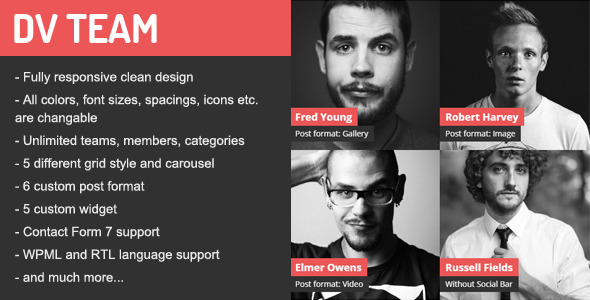
The core of DV Team is a custom post type. Every team member is a normal WordPress entry, which means the content lives in the database independently of any page. Members can be grouped into categories, and categories can be used as filter buttons above a grid. There is no cap on the number of teams, members or categories, so the same install can power a company staff page, a speaker list, an author directory and a partner logo wall simultaneously.
Layout options are broader than the name suggests. The plugin ships several grid styles, including masonry, square, rectangle and thumbnail arrangements, plus a filterable grid and touch-enabled carousels. Each member can be presented in one of six post formats: standard, gallery, image, video, link and quote. That range is what allows the same plugin to double as a portfolio, a product gallery or a client logo showcase, which the vendor explicitly lists as an intended secondary use.
Clicking a member opens a detail panel rather than a separate page. The panel can slide in from the right, the left, or appear centred, and there is a setting to enable or disable the body-scroll lock that usually accompanies such overlays. Inside the panel, member data is joined by a social icon bar and optional skill bars for showing proficiency levels.
Styling is handled through a dedicated settings panel instead of a stylesheet edit. Colours, font sizes, spacing, icon choices and the filter menu font size are all exposed as options, and the colour pickers support transparency. Because the plugin also emits unique IDs on each member thumbnail, targeted CSS overrides remain possible when the panel does not cover a specific case.
Placement is handled by a shortcode generator embedded in the TinyMCE editor, so shortcodes can be inserted without memorising attribute names. Five custom widgets provide the same output for sidebar and footer areas. The plugin loads its JavaScript and CSS only on pages where a shortcode or widget is actually present, a change introduced in version 1.6 that keeps unused pages free of the extra requests.
On the compatibility side, the vendor lists WPML support, a bundled .pot translation file, RTL language support, Contact Form 7 integration and SiteOrigin Page Builder compatibility. Source files for the JavaScript, CSS and PHP are included in the purchase.
Where DV Team fits, and where it does not
The strongest fit is a WordPress site that already has a theme and needs a people directory bolted on. A recruitment agency listing consultants by specialism, a consultancy showing partners and associates, a conference site presenting speakers by track, or a school publishing staff by department are all natural uses. The filterable grid plus category taxonomy handles the “find the right person” task well, and the popup panel keeps visitors on the listing page instead of sending them to thin individual pages.
A second good fit is the multi-purpose build. Because the same shortcode can render logos, portfolio items or product thumbnails, an agency building several small client sites can reuse one $19 licence across similar layouts rather than buying a separate portfolio plugin for each project.
Translation-heavy projects also benefit. WPML compatibility and RTL support mean the plugin can serve a bilingual corporate site without a custom localisation job.
Where it is the wrong choice is on a site that has standardised on the block editor. The vendor states the plugin is not Gutenberg optimised, so there is no native block for placing a team grid. Content is inserted through shortcodes or widgets, which works, but it sits outside the modern editing workflow and will feel inconsistent on a site built entirely from blocks. Anyone who wants to place and preview a team grid visually inside the editor should look at a block-based alternative instead.
A second poor fit is a project needing features the plugin does not advertise: no member search, no front-end submission, no import or export of member records, and no stated integration with membership or directory plugins. If the requirement is a searchable staff database with member logins, this is the wrong tool.
Strengths and limitations
Strengths
- Shortcode and widget output means the plugin works with almost any theme, including older ones, without a page builder dependency.
- Conditional asset loading keeps the performance cost off pages that do not display a team.
- Deep styling controls cover colours, typography, spacing and icons from the admin, reducing the need for custom CSS.
- Six post formats and multiple grid styles let one plugin cover team pages, portfolios, galleries and logo walls.
- WPML support, a .pot file and RTL support make it viable for multilingual and right-to-left sites.
- Source files are included, so a developer can extend or debug the plugin directly.
- Established listing with 2,448 sales and a 4.3 rating, which suggests the core output holds up in production.
Limitations
- No Gutenberg block. The vendor confirms the plugin is not block-editor optimised, so placement is shortcode-based only.
- The most recent update was January 2023. The vendor’s compatibility list covers WordPress 6.0 through 7.0, but the plugin has not received a release in the time since, so buyers should verify behaviour on the current WordPress version before committing.
- No member search, filtering by text, or front-end submission. Categories filter the grid; they do not search it.
- No documented import or export tool, so migrating an existing staff list means entering records manually or writing a script.
- Some reviews and the vendor’s own feature list suggest the settings panel is extensive. That breadth is useful, but it also means configuration is a deliberate task rather than a two-minute install.
- Page-builder support is limited to SiteOrigin. Elementor, WPBakery and similar builders are not listed as compatible, and the demo runs on Elementor, which may cause confusion about what is officially supported.
How it compares with the wider category
Team-showcase plugins generally split into three groups: block-based plugins built for the modern editor, page-builder add-ons that only work inside one builder, and shortcode-driven plugins that work anywhere. DV Team sits firmly in the third group.
Against block-based alternatives, it loses on editing experience. A block plugin lets an editor drop a team grid into a page and see it immediately; DV Team requires a shortcode with attributes. It wins on portability, because the same shortcode renders identically regardless of theme or builder.
Against page-builder add-ons, the trade-off reverses. A builder add-on integrates tightly with its host and inherits that builder’s styling system, but it becomes useless if the site later migrates to a different builder or a block theme. DV Team survives that migration.
Against generic portfolio plugins, DV Team is narrower in some ways and broader in others. It lacks the filtering and lightbox sophistication of dedicated portfolio tools, but it adds skill bars, social icon bars and member-specific fields that a portfolio plugin would not provide out of the box.
The practical question is whether the project values editor convenience or long-term independence. DV Team is built for the second.
Frequently Asked Questions
Does DV Team work with the WordPress block editor?
No. The vendor lists the plugin as not Gutenberg optimised, so there is no dedicated block for inserting a team grid. Content is placed using shortcodes generated from the TinyMCE editor or through the plugin’s five widgets. Shortcodes still function inside block-editor pages, but the grid will not preview live in the editor.
Can DV Team be used for portfolios or product galleries instead of a team page?
Yes. The vendor explicitly lists portfolios, product galleries and logo displays as alternative uses. Each entry supports six post formats, including gallery, image, video, link and quote, and the grid styles can be switched between masonry, square, rectangle and thumbnail. That flexibility is what allows one shortcode to serve several different content types.
Is DV Team compatible with WPML and right-to-left languages?
Yes. WPML support is listed in the plugin specifications, and RTL support was added to the settings page in version 1.5.2. A .pot translation file is bundled for translating the interface strings. Member content itself is translated through the standard WPML workflow, since each member is a normal WordPress post.
Does the plugin slow down pages that do not show a team?
No. Since version 1.6, DV Team loads its scripts and styles only when a shortcode or widget is present on the page. Pages without a team grid therefore carry no extra CSS or JavaScript from the plugin. This conditional loading was introduced specifically to reduce page weight and lower the risk of conflicts with other plugins.
Verdict
DV Team is a sensible purchase for agencies and freelancers who need a flexible people directory that works across many themes and does not lock a site into a page builder. The combination of shortcode output, deep styling controls, multiple grid styles and WPML support covers a lot of ground for $19, and the sales and rating history suggest it delivers reliably. It is also a reasonable choice for anyone repurposing a team grid as a portfolio or logo wall. Buyers should avoid it if the project is built entirely in the block editor, if it needs searchable member records or front-end submission, or if they require a plugin with an active release cadence, since the last update was January 2023. The lack of a Gutenberg block is the single biggest practical drawback, and it will matter more as block-based editing becomes the default.