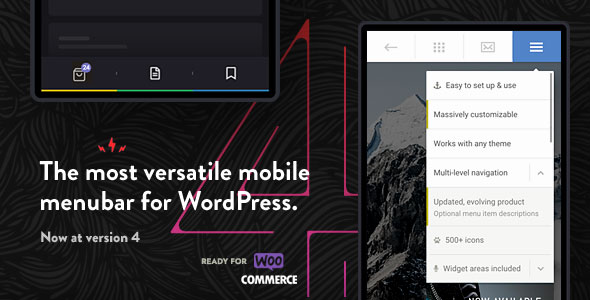
Touchy is a WordPress plugin that replaces a theme’s default header and navigation with a dedicated mobile menu system, built and sold by BonfireThemes on CodeCanyon for $26. It adds a configurable menu bar and drop-down panel with call, email, search and WooCommerce buttons, then hides the theme’s own header so the two do not compete for space. It suits site owners who want a phone-friendly navigation layer without rebuilding their theme, and it has sold 2,088 copies with a 4.91 average from 114 reviews.
What Touchy Interface Elements Actually Add to a WordPress Site
The plugin is best understood as a self-contained navigation and header layer that sits on top of whatever theme is already installed. Its Touchy Interface Elements are configured through the WordPress Live Customizer, so every change previews in real time before it is published — no separate settings screen and no page reload to check a colour.
A menu bar that can be repositioned and restyled element by element
The bar itself is the most configurable part. It can sit at the top or bottom of the screen, use fixed or absolute positioning, and be given a see-through effect through adjustable transparency. Height, distance from the screen edges and corner roundness are all editable. Each button — back, call, email, search and WooCommerce — can be reordered, hidden entirely, or recoloured on its own, and the dividers between them can be resized or removed. The default icons can be swapped for any of more than 1,500 alternatives. Two optional touches matter in practice: a slide-in animation on page load, and a shadow that grows when the page is scrolled, which helps the bar stay legible over light content.
A multi-level accordion menu that copes with deep site structures
The drop-down panel handles nested navigation as an accordion, expanding sub-levels in place rather than pushing users to a new screen. When a menu has more items than the viewport can hold, the panel scrolls. Sub-menus open from an arrow by default, or from the whole menu item if that behaviour is switched on — the latter is the sensible choice for one-page sites built on anchor links, where tapping a link should also close the panel. Menu items accept icons from the same 1,500-icon set, plus short descriptions, and individual items can carry a visual highlight. Font size and line height are adjustable separately for item labels and descriptions, and the menu can borrow a font already registered by the theme so it does not look pasted on. A right-to-left option is included for Arabic, Hebrew and similar locales.
Widget areas that turn the menu into more than a link list
Two unstyled widget locations sit at the top and bottom of the menu panel. Because they are plain widget areas, they accept HTML, shortcodes and embed codes, which means promotional blocks, social buttons, a highlighted announcement or a call-to-action can live inside the menu. This is the feature that most distinguishes the plugin from a simple hamburger replacement: the panel becomes a small content surface rather than only a list of pages.
Resolution targeting and theme header suppression
Display can be limited to specific screen widths, so the mobile menu appears only where it is wanted. When it is active, the plugin can hide the theme’s own menu or header by CSS class or ID. That second capability is what makes it theme-agnostic in practice — the plugin does not need the theme’s cooperation, only the correct selector. The vendor lists compatibility from WordPress 5.6 through 6.9 and across IE9 to Edge, Chrome, Firefox, Safari and Opera, and includes the unminified JavaScript, CSS and PHP source files.
Where This Plugin Fits and Where It Does Not
The strongest fit is an existing site on a theme whose mobile menu is weak — cramped, hard to tap, or missing quick contact actions. A service business that wants a persistent call button on phones is a textbook case: the bar can be pinned to the bottom of the screen with a phone icon, and the theme’s original header hidden, without touching theme files.
It also suits agencies maintaining several client sites on different themes, because one configuration pattern transfers between them. One-page sites with anchor navigation benefit from the close-on-click option. Stores running WooCommerce get a cart button in the bar. Sites in right-to-left languages are covered. And because the plugin can be restricted to certain resolutions, a desktop layout can be left untouched while phones get the new navigation.
It is the wrong choice for a site built with the block editor’s full-site editing features and a theme whose header is already composed in blocks. Touchy is not Gutenberg-optimised, so it does not integrate with that header system — it overlays it. Anyone wanting to edit the navigation inside the Site Editor will find two competing systems rather than one. It is also a poor fit for a project that needs a mega-menu with images and columns on desktop, since the plugin’s purpose is the compact mobile panel.
Strengths and Limitations
Strengths
- Real-time preview through the Live Customizer makes visual tuning fast and reversible.
- Per-button control over order, visibility, colour and icon gives unusually fine-grained results for the price.
- The two widget areas extend the menu into a content and promotion surface, not just a link list.
- Hiding the theme header by class or ID means it works with most themes without modification.
- Resolution targeting allows a mobile-only rollout on a site that keeps its desktop design.
- Source files are included, so developers can extend or audit the code.
- A 4.91 rating across 114 reviews and more than 2,000 sales is a meaningful track record for a $26 item.
Limitations
- Not Gutenberg-optimised: it does not integrate with block-based headers, so full-site-editing themes end up with two navigation systems to maintain.
- Hiding the theme header relies on identifying the right CSS class or ID. On themes with unusual markup this takes trial and error, and a wrong selector can leave two headers visible or hide more than intended.
- Configuration lives in the Customizer, which is a crowded panel on many sites and can be slow to load with many settings registered.
- IE9 through IE11 are listed as supported browsers, which signals legacy code in the stack; buyers should check current behaviour on modern mobile browsers rather than assume the list is a guarantee.
- The vendor does not state accessibility conformance for the menu — keyboard focus handling and screen-reader labelling are not documented in the supplied specifications, so they need testing before use on a site with accessibility obligations.
How It Compares With the Wider Category
Most alternatives fall into three groups. The first is the theme’s built-in mobile menu, which costs nothing but is only as good as the theme author made it — often a squeezed version of the desktop menu with no contact actions. The second is a general-purpose mega-menu plugin, which tends to be desktop-first and heavier, with a mobile mode bolted on. The third is a page builder’s own header module, which is powerful but ties the site to that builder.
Touchy sits in a narrower slot: a mobile-first navigation layer that works with any theme and does one job thoroughly. Compared with a built-in theme menu, it adds quick-contact buttons, search, widget areas and per-element styling. Compared with a mega-menu plugin, it is lighter and more focused on small screens, but offers less desktop layout power. Compared with a builder header module, it is theme-independent but cannot match a builder’s drag-and-drop flexibility. The honest summary is that it wins on speed of setup and mobile ergonomics, and loses on integration with modern block-based theming.
Frequently Asked Questions
Does Touchy work with any WordPress theme?
Yes, in practice it works with most themes because it adds its own header layer and hides the theme’s original menu by CSS class or ID. The caveat is that the correct selector must be found for each theme. Themes with unusual or deeply nested header markup may need extra CSS work before the swap looks clean.
Can the mobile menu be shown only on phones and tablets?
Yes. The plugin includes an option to display only at specified screen resolutions, so the bar and panel can be limited to smaller viewports while the desktop layout stays as designed. This makes it viable as a targeted fix for a site whose desktop navigation already works well and should not change.
Is Touchy compatible with the block editor and full-site editing?
No. The vendor lists the plugin as not Gutenberg-optimised, so it does not integrate with block-based headers or the Site Editor. On a full-site-editing theme it runs alongside the block header rather than replacing it within that system, which means two navigation setups to keep in step. Classic and hybrid themes are the intended environment.
What do the two widget areas inside the menu do?
They are unstyled widget locations at the top and bottom of the menu panel that accept HTML, shortcodes and embed codes. In practice that means promotional banners, social buttons, highlighted announcements or call-to-action blocks can appear inside the mobile menu. They are plain widget areas, so anything a widget can render will display there.
Verdict
Buy Touchy if the site runs a classic or hybrid theme with a weak mobile menu and the goal is a polished, phone-first navigation bar with contact buttons, search and room for promotional content — especially at $26 with source files included. It is also a sensible pick for freelancers and agencies who want one reusable mobile navigation pattern across client sites. Do not buy it for a full-site-editing theme, where the block header is the correct place to work, or for a project that needs complex desktop mega-menu layouts. Anyone with strict accessibility requirements should test keyboard and screen-reader behaviour on the demo before committing, since the vendor does not document conformance.