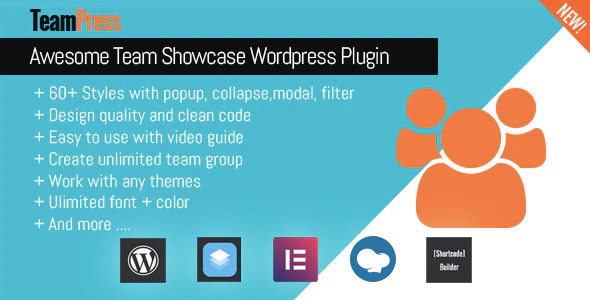
TeamPress is a WordPress plugin that stores staff and team-member profiles — name, photo, bio, social links and any custom fields — and renders them on a site through a library of prebuilt layouts. It is aimed at agencies, freelancers and in-house site owners who need a structured “meet the team” section without building templates by hand. The product sits in CodeCanyon’s Interface Elements category, costs $45 for a lifetime licence and has been developed by Ex-Themes.
The plugin has built a meaningful track record: roughly 1,983 sales and a 4.9-out-of-5 average across 52 reviews. That volume matters when judging a niche utility like TeamPress Interface Elements, because it means the layout library has been exercised on real client sites rather than only in a demo. The vendor’s own showcase list spans law firms, real-estate brokerages, clinics, foundations and community organisations — a spread that says more about the plugin’s flexibility than any feature bullet.
What TeamPress Actually Does Beyond a Simple Staff Grid
At its core the plugin registers team members as structured content, then gives you shortcodes, widgets and page-builder elements to output them. The interesting part is how much control sits between those two ends.
A large library of layouts and output formats
The vendor lists more than 60 layouts, split across four shortcode families: grid (30+ styles), carousel (30+ styles), list (3 styles) and table (2 styles). Masonry is available for grid output. In practice this means the same member records can be presented as a dense directory table, a scrolling carousel for a homepage strip, or a multi-column grid with lightbox detail views. Switching format is a shortcode attribute change, not a rebuild.
Filtering and search that work without page reloads
Alphabetical filtering, keyword search, category filtering and load-more pagination all run over AJAX, so results update in place. The alphabet filter is genuinely useful for large directories — a 60-person brokerage or a hospital department list — where visitors arrive looking for one name. Categories let a single member pool be sliced into departments, offices or practice areas without duplicating records.
Design control without touching code
Colours, font family, font size and font colour can be set globally or per style, and the plugin supports custom fields so you can add data the fixed schema does not cover — a bar admission year, a licence number, a languages spoken field. A shortcode builder generates the shortcode through a point-and-click interface, which lowers the barrier for editors who are not comfortable reading attribute syntax.
Detail views, linking and performance options
Full member content can open in a lightbox, a modal or a collapsible panel, or link out to a dedicated single-member page. A custom URL can replace the single page entirely — useful when a profile already lives on a LinkedIn page or an external bio. On the performance side, the plugin lets you choose whether its CSS and JavaScript load site-wide or only on pages that contain a shortcode, which keeps unused assets off unrelated pages.
Page builder and multilingual support
Native elements exist for Elementor, WPBakery Page Builder and SiteOrigin, with WPML declared for multilingual sites and RTL support for right-to-left languages. WooCommerce compatibility is listed for versions 5 through 9, though the vendor does not explain what that compatibility involves — it most likely means the plugin coexists cleanly rather than adding shop-specific features.
Where TeamPress Fits and Where It Does Not
The clearest fit is any organisation whose team page is a destination rather than an afterthought. Professional services firms — law practices, advisory firms, real-estate brokerages — typically need individual profiles with credentials, contact routes and social links, plus filtering by office or specialism. The vendor’s showcase list is dominated by exactly these. Healthcare clinics, foundations listing boards and trustees, and membership organisations with committee pages are similar cases.
A second fit is the agency workflow. Because the plugin ships with page-builder elements and a shortcode builder, a freelancer can hand a client a site where the marketing coordinator adds new staff without editing templates. The custom fields and per-style colour controls mean brand consistency survives that handover.
The wrong choice is a small site that needs one static row of four headshots. A block-based theme or a page builder’s own team widget handles that with no extra plugin, no licence and no update cycle. TeamPress earns its $45 when the member list is long, filterable, or likely to change often — not when it is a one-off design element.
Strengths and Limitations
Strengths
- Breadth of output formats. Grid, carousel, list, table and masonry cover most team-page patterns without custom CSS.
- Real filtering. AJAX alphabet, search, category and load-more are the features that separate a directory from a gallery.
- Editor-friendly tooling. The shortcode builder and quick-edit support reduce reliance on developers for routine updates.
- Conditional asset loading. Restricting CSS and JS to pages with shortcodes is a sensible default that many similar plugins omit.
- Active maintenance. The changelog shows security hardening in 2024 and 2025 and a January 2026 release addressing a WordPress 6.9 and PHP 8.3 notice — a sign the author tracks current WordPress versions.
- Documented compatibility. Declared support runs from WordPress 5.3 through 7.0.x, which covers most sites still in service.
Limitations
- Price rose with the marketplace fee. The vendor states the Envato fee change pushed the licence from $29 to $45. Buyers comparing against older reviews should expect the higher figure.
- No subscription or support term is stated. The listing does not specify how long support lasts or what it covers, so that needs confirming before purchase.
- Style count is not the same as design quality. Sixty-plus layouts means many variations on a theme; a handful will suit a given brand, and the rest are noise.
- Page-builder lock-in is partial. Native elements exist for three builders, but sites on the block editor rely on shortcodes and widgets rather than a dedicated block.
- WooCommerce compatibility is unexplained. The vendor lists versions without describing the integration, so it should not be assumed to do anything specific.
- Security history exists. Two releases addressed access-control and XSS/LFI issues. That the author patched promptly is reassuring, but it argues for keeping the plugin updated.
How TeamPress Compares With the Wider Category
Team-showcase plugins fall into three rough groups: lightweight shortcode plugins that output a basic grid, page-builder add-ons that bundle a team widget among dozens of others, and dedicated directory plugins built for staff or listing management. TeamPress sits closest to the third group while keeping the price and simplicity of the first.
Against a basic grid plugin, the difference is filtering, search, categories and multiple output formats — capabilities that only matter once the roster grows past a dozen people. Against a bundled page-builder widget, TeamPress offers more layout choice and a portable data model: members are their own content type, so switching themes or builders does not orphan the data. Against full directory plugins, it is narrower — it does not attempt front-end submissions, paid listings or complex taxonomy management — but it is also far simpler to configure and cheaper than most directory suites.
The trade-off is specialisation. TeamPress does one job, so a site that also needs a portfolio, a testimonial system and a knowledge base will end up with several plugins rather than one. For teams whose primary need is a well-presented, filterable staff directory, that narrowness is an advantage.
Frequently Asked Questions
Does TeamPress require coding to set up?
No. TeamPress is configured through the WordPress admin, with a shortcode builder that generates output settings through a point-and-click interface. Layout, colours, fonts and member fields are all set in the dashboard. Custom CSS is optional for fine-tuning, not a requirement for getting a working team page live.
Can TeamPress handle a large staff directory with filtering?
Yes. The plugin supports AJAX alphabetical filtering, keyword search, category filters and load-more pagination, all without page reloads. Those features are designed for directories where visitors need to find a specific person quickly. For very large rosters, the table and list layouts generally read better than a long grid.
Is TeamPress compatible with Elementor and WPML?
Yes. The vendor declares native elements for Elementor, WPBakery Page Builder and SiteOrigin, and lists WPML support for multilingual sites alongside RTL support. WordPress compatibility is declared from version 5.3 through 7.0.x. Exact behaviour on any specific combination is best confirmed against the live demo before purchase.
Does TeamPress work with the WordPress block editor?
It works, but without a dedicated block. On block-based sites, team output is inserted through shortcodes or widgets rather than a native block element. The vendor’s builder integrations are aimed at Elementor, WPBakery and SiteOrigin, so block-editor users should expect a shortcode-driven workflow rather than drag-and-drop.
Verdict
TeamPress is worth buying for organisations that treat their team page as a working directory: professional services firms, clinics, foundations and membership bodies with enough people to justify filtering and search. Agencies maintaining multiple client sites will also get value from the page-builder elements and the clean handover to non-technical editors. It is a poor fit for small sites needing a single static row of portraits, where a theme or builder widget costs nothing extra. The $45 price is fair for the feature set but higher than older reviews suggest, and buyers should confirm the support terms before committing. With a long sales history, a strong rating and a 2026 maintenance release, the maintenance risk looks low.