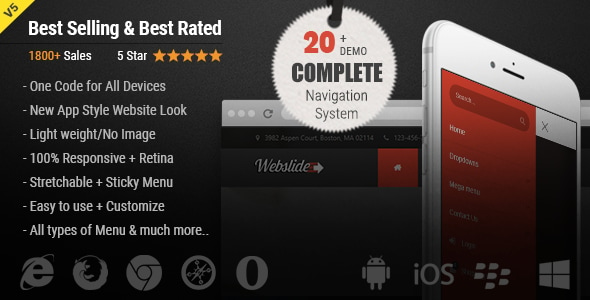
WebSlide Navigation is a front-end code package for building large, multi-column dropdown menus on websites. It ships as HTML, CSS and JavaScript files rather than a plugin, and it provides more than twenty ready-made menu layouts covering Bootstrap 5 mega menus, off-canvas sidebars, full-screen navigation and mobile slide-down toggles. It suits developers and agencies who want a pre-built navigation system they can drop into a Bootstrap project and restyle, rather than a point-and-click WordPress menu builder.
The item has been sold 1,988 times on CodeCanyon and carries a 4.79 out of 5 rating across 73 reviews, which is strong evidence that the code holds up in real deployments. It is developed by WebSlideMenu and costs $10.
What the package actually gives a developer
The core proposition is breadth of layout in a single, lightweight codebase. The vendor supplies a demo site with a long list of menu variants, and each one is a separate HTML page with its own CSS and script references. That structure matters: a developer can copy the markup for the layout that fits a project and leave the rest behind, rather than loading one monolithic menu script that carries every variant.
Several capabilities are worth calling out because they change what a project can do:
- One markup set for desktop and mobile. The same navigation code adapts between a horizontal mega menu on large screens and a hamburger-triggered drawer or slide-down panel on phones. Maintaining two separate menus is a common source of inconsistency, and this removes it.
- Bootstrap 5 grid inside the dropdown. Mega menu panels are laid out with Bootstrap’s column system, so a wide panel with headings, link lists, images and promotional blocks can be built with classes a Bootstrap developer already knows.
- Off-canvas and full-screen modes. Beyond the standard dropdown, the package includes side panels that slide in from the edge, two independent off-canvas menus on one page, anchored links that open a panel, and a full-screen overlay menu. These suit app-style interfaces and content-heavy sites where a conventional dropdown feels cramped.
- Multiple interaction models. Menus can open on hover or on click, and a pure-CSS variant is included for projects that want no script dependency at all for the menu behaviour.
- Sticky and stretchable options. A top-fixed menu that stays visible during scroll, and a stretchable variant that spans the full viewport width, are both provided as ready layouts.
- Right-to-left support. An Arabic RTL demo is included, which is a genuine requirement for regional sites and something many menu packages in this price bracket skip.
- Scalable vector icons and CSS variables. Icons stay sharp at any size, and the recent move to CSS custom properties means colours and spacing can be themed from a small set of variables instead of hunting through stylesheets.
The most recent release, version 5.6 from April 2026, is the significant one. It added Bootstrap 5 support, removed the jQuery dependency in favour of plain JavaScript, introduced CSS variables and reworked the documentation. Earlier versions stretch back to 2015, and the changelog shows a steady record of browser-specific fixes for Chrome, iOS Safari and Microsoft touch devices. That history is a reasonable proxy for maintenance quality, though buyers should note the gap between the February 2020 release and the 2026 update — long stretches without a release have occurred before.
Where WebSlide fits, and where it does not
The strongest fit is a custom-built or theme-based site on Bootstrap where the navigation needs to carry real content: product categories with thumbnails, service lists with descriptions, or a corporate menu with several columns of links. The e-commerce layouts in the package are built for exactly that, and using Bootstrap’s grid means the panel content stays aligned without bespoke CSS.
A second good fit is an agency or freelancer who builds several sites a year. Buying once and reusing the layouts across projects is inexpensive at this price, and the included installation guide shortens the setup step on each new build.
It also works well for app-style interfaces that want a collapsible sidebar with a hamburger trigger, and for single-page sites where the menu needs to scroll to anchors rather than load new pages — a single-page navigation layout is included for that case.
The wrong choice is a non-technical site owner on WordPress, Shopify or another hosted platform who expects to configure a menu through an admin screen. WebSlide is code. It has to be pasted into templates, its stylesheets enqueued, and its markup edited by hand. On WordPress specifically, the native menu system and the block editor’s navigation tools will be faster for most users, and a plugin built for the platform is the sensible route. Similarly, a project that has already standardised on a different CSS framework will spend more time overriding WebSlide’s Bootstrap assumptions than it saves.
Strengths and limitations
Strengths
- Unusually wide range of menu patterns for the price: mega menus, half menus, off-canvas drawers, full-screen overlays, sticky bars and vertical split navigation.
- No jQuery in the current version, which keeps the payload small and avoids a dependency many modern stacks have dropped.
- Genuinely lightweight assets — the vendor states the code carries no image dependencies, so the menu does not add heavy requests.
- Bootstrap 5 grid integration means panel layouts follow a system most front-end developers already understand.
- RTL support and vector icons are included rather than sold as extras.
- An eleven-year changelog with specific, named browser fixes suggests the author tests on real devices.
- Source files are supplied in full, so nothing is locked behind an encoder or minifier.
Limitations
- There is no visual builder or settings panel. Every change — colours, spacing, which columns appear — happens in the HTML and CSS files. That is fine for a developer and a barrier for anyone else.
- The package is front-end only. It provides markup, styles and menu behaviour, not a content management integration, so wiring menu items to dynamic data is the buyer’s job.
- Because each layout is a separate demo page, moving between variants means copying markup rather than toggling an option. Projects that need several menu types on one site will duplicate some code.
- The changelog shows the item went roughly six years between the 2020 and 2026 releases. The current version is up to date, but buyers should not assume a fast release cadence for future browser quirks.
- Documentation quality is described by the vendor as improved in the latest release; the vendor does not state how extensive the guide is, so it is worth checking the demo and docs before purchase.
- Sticking closely to Bootstrap’s conventions is an advantage inside Bootstrap projects and a source of conflicts outside them.
How it compares with the wider category
Navigation components for sale generally fall into three groups: plugin-style menu builders tied to a CMS, JavaScript UI libraries that render menus from configuration data, and static code kits like this one. Menu builders win on convenience for non-developers but lock the menu to one platform. JavaScript libraries win on dynamic, data-driven menus but require the developer to learn an API and often add a larger runtime.
WebSlide sits in the third group and competes on variety and transparency. Where a generic Bootstrap navbar gives one pattern and expects the developer to extend it, this package hands over twenty-odd finished patterns with the CSS already written. Where a UI library asks for a configuration object, WebSlide asks for HTML. The trade-off is clear: less abstraction, more direct control, and no dependency on a vendor’s runtime beyond the included script.
Against free alternatives — a hand-built Bootstrap navbar, or an open-source menu component — the case rests on time. A developer can build a mega menu from scratch, but matching the range of off-canvas, full-screen and RTL variants here would take considerably longer than the $10 asking price. Against premium menu plugins, WebSlide offers more layout choice but no admin interface, so the comparison depends entirely on whether the buyer writes code.
Frequently Asked Questions
Does WebSlide work with Bootstrap 5?
Yes. Bootstrap 5 support was added in version 5.6, released in April 2026, and the mega menu panels use Bootstrap 5’s grid classes for column layout. The same release removed the jQuery dependency, so the menu scripts run on plain JavaScript. Buyers using older Bootstrap 4 projects should check the demo, since earlier versions targeted that framework.
Can WebSlide be used in a WordPress theme?
Technically yes, because the output is standard HTML, CSS and JavaScript that can be placed in a theme template. However, it does not integrate with WordPress’s menu management system, so links would need to be hard-coded or connected manually. For most WordPress sites, the built-in navigation tools or a dedicated menu plugin are the more practical choice.
Is WebSlide a plugin or a script?
It is a script package, not a plugin. The download contains HTML pages, CSS stylesheets and JavaScript files that are copied into a project and edited directly. There is no installation wizard, no settings screen and no database component. The vendor includes an installation guide, and the source files are supplied unminified so they can be modified.
Does WebSlide support right-to-left languages?
Yes. A dedicated Arabic RTL demo is included in the package, with stylesheets adjusted for right-to-left reading order. That makes it usable for Hebrew, Arabic and Persian sites without rebuilding the menu layout from scratch. The vendor lists RTL support as a standard feature rather than an add-on, and it has been part of the package since version 3.0.
Verdict
WebSlide Navigation is a sound purchase for front-end developers and agencies working in Bootstrap who need a menu system with more range than a default navbar and are comfortable editing HTML and CSS. The combination of mega menu layouts, off-canvas panels, full-screen modes and RTL support in one lightweight, jQuery-free package is difficult to match at this price, and the sales and rating figures back that up.
It is not the right product for site owners who want to manage menus through an admin panel, nor for teams standardised on a CSS framework other than Bootstrap. Those buyers will find the code-first approach and Bootstrap assumptions work against them. For everyone else — particularly anyone building an e-commerce or corporate navigation with several columns of content — the $10 outlay is easily justified by the setup time it removes.