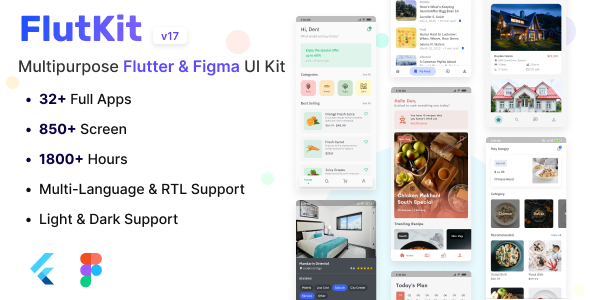
FlutKit is a commercial UI kit for Flutter, Google’s cross-platform mobile development framework, sold on CodeCanyon for $39 by the developer coderthemes. It bundles roughly 550 screens, about 200 reusable widgets and 23 sample applications, plus a matching Figma design file, so a team can assemble a polished Android and iOS interface without designing every screen from scratch. It suits freelancers and small studios building consumer apps on a tight timeline, and developers who want working reference code for common mobile patterns.
What the kit actually gives a Flutter project
The value of a UI kit is measured in how much work it removes, and FlutKit attacks that from several directions at once. The screen library is the headline: 550-plus screens spread across 23 sample apps, each covering a recognisable category such as shopping, food delivery, hotel booking, news, health, chat, music and events. Rather than starting from an empty scaffold, a developer can lift the screens closest to the target product and rework them.
Underneath the screens sits a widget collection of around 200 components. These range from ordinary building blocks — cards, chips, form inputs, sliders, steppers, snackbars and bottom sheets — to custom pieces such as animated buttons, liquid text fill, onboarding wizards and a custom bottom navigation bar. Because each widget is a self-contained Dart file, individual pieces can be pulled into an existing app without importing the whole kit. The vendor states the code organisation is deliberately flat so any part can be extracted and reused.
Theming is handled properly rather than bolted on. Every sample ships with light and dark variants, and the Figma file mirrors this using Tokens Studio, a plugin that stores colour and typography values as design tokens so a designer can change a palette in one place. That matters for teams where design and development need to stay in sync.
Several samples go beyond static layout. The Learning, Estate and Cookify apps are built with state management, models fed from JSON data and the BLoC pattern — a structured way of separating business logic from the interface. That makes them useful as architectural references, not just visual mockups. The kit also demonstrates integrations that usually cost days to wire up: Firebase Authentication, Google Sign-In, Razorpay payments, AdMob advertising, image picking and cropping, video playback, web views, URL launching and Android quick actions. A separate set of screens covers authentication flows, quizzes, dashboards, mail, profiles, settings and wallets.
Compatibility is current. The vendor lists Flutter 3.x support, with the most recent update in October 2025 aligning the kit to Flutter 3.35. Source files are supplied as Dart, YAML, .java and .h — the last two being the native Android and iOS bridge files some plugins require.
Where FlutKit fits, and where it does not
The clearest fit is a freelancer or small agency quoting on a consumer app with a familiar shape: an e-commerce catalogue, a booking flow, a content feed, a chat product. Those projects live or die on interface polish, and a kit like this compresses weeks of screen design into days. It is equally useful for a developer learning Flutter who wants to read real, multi-screen code rather than isolated snippets — the BLoC-based samples in particular show how a larger app is structured.
It also works well as a component source for an existing product. A team that already has an app but needs a chart, a carousel or a custom onboarding flow can copy the relevant widget and adapt it, paying $39 for what would otherwise be a day of work.
The wrong choice is a project with a strong existing design system or strict brand guidelines. Dropping in screens built around someone else’s visual language creates more rework than it saves, and the effort of stripping out the kit’s styling often exceeds building from scratch. Teams that need deep custom animation or a highly unusual navigation model will also find the samples more of a starting reference than a shortcut.
Strengths and limitations
Strengths
- Breadth is genuinely unusual: 550-plus screens and 23 full sample apps for $39 undercuts almost any alternative on cost per screen.
- Both design and code are included. The Figma file with design tokens means a designer can adjust the system before a developer touches Dart.
- Real integrations are demonstrated, not just described — Firebase Auth, Google Sign-In, Razorpay, AdMob and image cropping all appear in working samples.
- The BLoC and JSON-model samples give junior developers a readable architecture reference.
- Modular file structure means single widgets can be lifted into unrelated projects.
- Strong reception on the marketplace: 1,917 sales and a 4.76 out of 5 rating across 42 reviews.
- The vendor maintains it actively, tracking Flutter releases through to 3.35 in late 2025.
Limitations
- Feature churn is visible in the changelog. Version 16 removed an entire sample app plus a list of packages including Rive, curved_navigation_bar and several icon sets, citing plugin compatibility and dependency overload. Anyone relying on those specific screens will find them gone.
- Because the kit covers so many categories, depth varies. Some samples are richer than others, and the vendor does not publish a per-app breakdown of which ones include state management.
- The vendor tags the item with “php script”, which is inaccurate for a Flutter product and suggests the listing metadata is not carefully maintained.
- There is no stated licensing guidance on using the screens in a client deliverable beyond the standard CodeCanyon terms, and no documented support SLA.
- Screens are demo-grade. Expect to replace placeholder imagery, wire real APIs and rework navigation for production.
How it compares with the wider UI kit category
Flutter UI kits generally fall into three groups: single-purpose templates that deliver one complete app, component libraries that supply widgets without full screens, and large multi-purpose kits like this one. FlutKit sits firmly in the third group, and that positioning is its main differentiator. A single-app template gives a cleaner codebase but only fits one product type. A pure component library stays flexible but leaves all the screen assembly to the buyer.
The trade-off for breadth is coherence. Multi-purpose kits tend to feel like a catalogue rather than a design system, and adapting one to a specific brand takes more judgement than adapting a focused template. Buyers who want a minimal, opinionated starting point may prefer a narrower product; buyers who want a large reference library to draw from will find the breadth here hard to match at this price. The inclusion of a Figma source file also puts it ahead of kits that ship code only, since design and development can work from the same tokens.
Frequently Asked Questions
Is FlutKit a complete app or just a design kit?
It is both code and design, not a finished product. The package contains runnable Flutter sample applications and a matching Figma file, but the samples are demonstrations rather than production apps. Buyers still need to connect their own backend, replace placeholder content and adapt the styling to their brand before shipping.
Does FlutKit work with the latest version of Flutter?
Yes, as of the October 2025 update. The vendor lists compatibility with Flutter 3.x and states the kit was aligned to Flutter 3.35 in version 17. Older projects on Flutter 2.x would need migration work, since the kit has moved through several major framework releases over its lifetime.
Can individual widgets be used without adopting the whole kit?
Yes. Each widget and screen is a separate Dart file, and the vendor explicitly supports extracting parts and dropping them into an existing Flutter project. This makes FlutKit practical as a component source even for teams that have no intention of building on its sample apps or its overall visual style.
Is the Figma file included in the purchase price?
Yes. Figma support was added in version 14 and remains part of the package. The file covers all components and includes light and dark modes managed through Tokens Studio, so a designer can adjust colours and typography centrally and hand a consistent system to the developer.
Verdict
FlutKit earns its place for anyone who needs a large, current library of Flutter screens and widgets at a low one-off price. Freelancers, small agencies and developers learning Flutter’s architecture will get disproportionate value from the sample apps and the Figma tokens. It is a poor fit for teams with an established design system, for projects needing bespoke interaction design, or for anyone who wants a single clean template rather than a broad catalogue. The 4.76 rating across 42 reviews and nearly 2,000 sales suggest buyers generally get what they expect. The visible removal of apps and packages in recent versions is the main caution — check that the specific samples a project depends on are still present before committing.